If you have been using ChatGPT or Claude for a year, there is a lot of you in there
How you write. What your offers are. Which clients you talk about. What you decided last spring and why. I do not want Foundation to start from zero on the call when all of that already exists. So before the call, you go and get it.
The Context Extraction Kit is a set of prompts you paste into the other tool. The Lite version is six prompts and an evening. It pulls the facts, a first pass at your voice, and three blocks ready to load into Perplexity. Every prompt is on this page, in order, with a copy button, so you do not need to leave it. What comes out is a folder of plain text files and three blocks loaded into your account. On the call we check Perplexity is reading all of it properly, instead of starting from zero.
One warning, because this is where people go wrong
It is a reading job. The prompts make the AI tag every line as something you said or something it guessed. Your job is to read, correct and delete. If a revenue number shows up that you never said, it came from an example, and it goes.
What you do before the call
Turn memory on in the tool you are exporting from.
ChatGPT: Settings, Personalization, memory and reference chat history on, Fast answers off. Use a normal chat, not a Temporary Chat. Claude: Settings, Your Claude, Memory from chats on.
Request your data export today.
ChatGPT: Settings, Data controls, Export data. Claude: Settings, Privacy, Export data. It takes a day to arrive. You do not need it for the prompts, but bring it to the call if it arrives.
Copy your own words by hand.
ChatGPT Custom instructions, every Project’s instructions, every custom GPT’s instructions. Claude account Instructions and Project instructions. Paste them into a doc called context-handwritten.
Open a new chat in the other tool and paste prompt 0.1, the ground rules.
Wait for it to reply Ready. If it replies with anything else, paste it again. Every prompt that follows goes in this same chat.
Copy this prompt0.1 The ground rules
I am building a context file about myself and my business to move into a new AI tool. For the rest of this chat, follow these rules without exception:

1. Use only what I have told you in this chat, what is in your saved memory about me, or what is in our past conversations. Never fill a gap with a plausible guess.
2. Quote me verbatim wherever you can. Put my exact words in quotation marks.
3. Tag every line with one of three tags: [stated] if I said it directly, [observed] if you saw it in how I work or what I asked for, [inferred] if you are guessing from a pattern. If you are not sure which, use [inferred].
4. Add an approximate date or time period to each item when you know it. Write "date unknown" when you do not.
5. If you have nothing on a topic, write UNKNOWN. Do not write a generic answer.
6. Write in plain Markdown with the exact headings I give you. No preamble, no closing summary, no advice unless I ask for it.
7. At the end of every answer, add a short section called "What I could not access" and list anything you were unable to check.
8. If something came from a time I was testing a product, role-playing, giving a hypothetical example, or working on a client's business instead of my own, tag it [test] and put it in its own section at the end. Never mix it with facts about me.
9. If the words came from an earlier AI answer and not from me, they are not mine. Tag them [ai] or leave them out. Never present an assistant's phrasing as my statement.
10. The date goes on the fact, not on your observation. "[stated] [March 2025]" means I said it in March 2025.
11. Keep each answer under 1,200 words. Put what I stated ahead of what you observed, and recent ahead of old. If you have more, end with a line that says "MORE AVAILABLE:" and list the topics, and I will ask for them.

Reply with "Ready" and nothing else.
Paste prompt 0.2, the memory dump.
You should get a code block of ten to eighty lines. If you get three, memory was off or you used temporary chats. That is fine, the next prompt reaches further. Save the output as a file called 02-memory.
Copy this prompt0.2 The stored memory dump
I'm moving to another service and need to export my data. List every memory you have stored about me, as well as any context you've learned about me from past conversations. Output everything in a single code block so I can easily copy it. Format each entry as: [date saved, if available] - memory content.

Make sure to cover all of the following, and preserve my words verbatim where possible: Instructions I've given you about how to respond (tone, format, style, 'always do X', 'never do Y'). Personal details: name, location, job, family, interests. Projects, goals, and recurring topics. Tools, languages, and frameworks I use. Preferences and corrections I've made to your behavior. Any other stored context not covered above. Do not summarize, group, or omit any entries. After the code block, confirm whether that is the complete set or if any remain.
Paste prompt 0.3, the history map.
Save as 03-history.
Copy this prompt0.3 The history map
Look back through our past conversations as far as you can reach. Do not summarize the conversations. Build a map.

## Topics
List every distinct topic we have discussed more than once. For each: the topic in five words or fewer, roughly how many conversations, the date range, and one verbatim line from me that shows what I wanted.

## Projects
List every project, launch, product, offer, or build I have worked on with you. For each: name, what it was, the dates, and its last known status (shipped, abandoned, unknown).

## People
List every person I have named. For each: name, their role in my life or business, and the context.

## Recurring questions
List the questions I keep coming back to, in my own words where possible.

## Likely stale
List anything above that is probably out of date based on how long ago it was last mentioned.

## What I could not access
Paste 1.1, the business snapshot, and read it slowly.
If the revenue line says something you never told it, delete that line. This is the most common place an AI pulls a figure from an example instead of a fact. Rough numbers beat no numbers. Save as 11-snapshot.
Copy this prompt1.1 Business snapshot
From everything you know about me, write my business snapshot. Use these headings exactly and the tagging rules from the ground rules.

## Business snapshot
- Business name and what I call myself
- What I sell, in one sentence, in my words if I have said it
- Who buys it, in one sentence
- Business model (one-time, subscription, retainer, hybrid) and current prices
- Revenue range for the last 12 months, only if I have mentioned it. Quote the exact figure or range I gave.
- Profit or take-home, only if I have mentioned it
- Stage (pre-revenue, first customers, growing, plateaued, scaling, winding down) with the evidence for your pick
- Team: who works with me, in what role
- Years in this business and what I did before it, if known
- Why I am building this. The personal reason, in my words.

## What I could not access
Paste 3.1, the voice samples.
You want fifteen to twenty five passages you actually wrote, typos and all. If it returns fewer than ten, come back when your data export arrives and feed it the export. Save as 31-voice.
Copy this prompt3.1 Voice samples
Find every piece of writing in our conversations that I wrote myself, not your drafts and not your edits. Things I pasted, typed, or dictated: emails I sent, posts I published, messages to clients, notes, rough drafts I started before asking for help, long messages to you where I was explaining something.

## Voice samples
Give me 15 to 25 passages, each 40 to 200 words, verbatim. For each:
- The passage, exactly as I wrote it
- Context: what it was (email, post, DM, note, message to you)
- Approximate date
- Who it was written to

Do not clean up typos, grammar, or punctuation. The rough version is the point.

## What I could not access
Paste 5.3, the consolidation.
It writes three blocks. Block A is forty to sixty memory lines. Block B is your custom instructions, under two hundred words. Block C is Project instructions, under 7,500 characters. Save all three.
Copy this prompt5.3 Build the three blocks
From everything in this chat, build three short blocks for loading into Perplexity.

## Block A: Memory seed
40 to 60 one-line facts about me, one per line, each a complete sentence in the third person, each under 25 words, each true and [stated] or [observed]. Lead with the business basics, then customer, then how I like to work, then voice, then life if included. Example shape: "[Name] sells [offer] to [customer] at [price]." No tags, no dates, no quotes in this block. Leave out family members' names, health details, exact home location, and personal financial figures unless I add them back myself.

## Block B: Custom instructions
150 to 200 words, first person, plain language, covering who I am, what I sell, who buys it, what I am working on now, and how I want an assistant to work with me. This goes into Perplexity's Custom instructions field, so write it as instructions to an assistant, not as a bio.

## Block C: Project instructions
Under 7,500 characters. Written as a note to a new hire who will work inside my Perplexity Project. Include: who I am and what the business does, my customer in two lines, my live offers with prices, how I want things written back to me, my voice rules in compressed form (top five always, top five never, three signature phrases), my standing instructions, and this rule word for word: "Never send, spend, publish, or change anything outside this conversation without asking me first." End with: "My full Context File is in this Project's files. Read it before any task that touches my business, my customer, or my voice."

Give me the character count of Block C.
Make a Drive folder called Material.
Put every file from this step in it, plus your five to ten best emails or posts, your offer and pricing, your frameworks or outline, three testimonials, and your sketch from step 3. One folder.
Load Block B now.
Open Perplexity, Settings, Personalization, Custom instructions. Replace your three lines from step 2 with Block B.
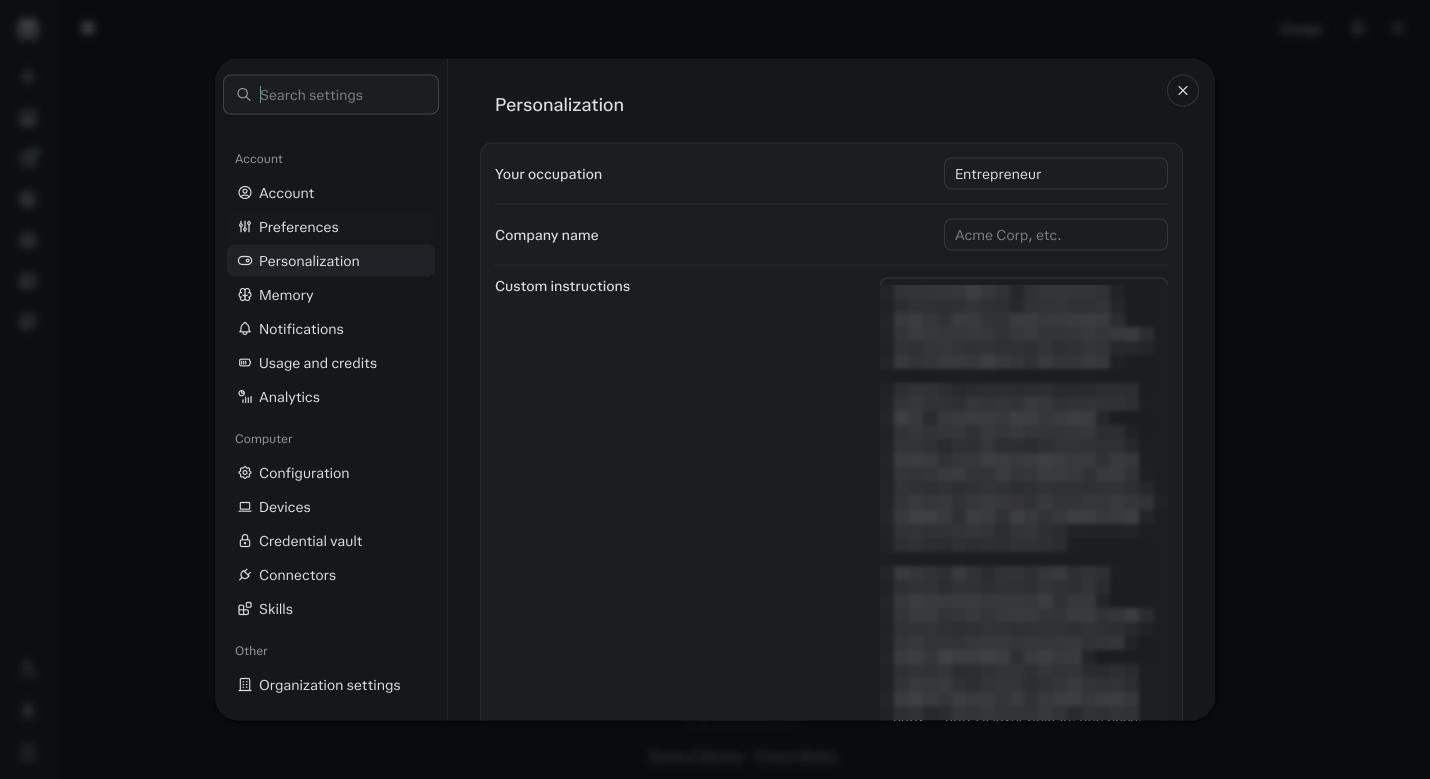
Personalization. Block B goes here, replacing the three lines from step 2. Load Block A now.
Open a normal session outside any Project. Paste ten lines at a time and say: remember these. Then open Settings, Memory, Manage and check they landed.
Keep Block C in the folder.
It goes into your Project in step 6.
Verify tomorrow.
In a brand new session, paste the verify prompt and do not add anything. Correct what is wrong and say remember that. Where it says it does not know something that is in your files, that is fine, the Project reads the folder in step 6.
Copy this promptverify Run this in Perplexity a day later
Without me telling you anything new, answer these from what you already know about me:

1. What do I sell, to whom, and at what price?
2. Who is my best customer and what problem do they bring me?
3. What am I working on right now and what have I been putting off?
4. How do I want you to write to me, and what have I told you never to do?
5. Describe my writing voice in five lines.
6. Name one thing you know about me that is not about my business.

For each answer, say where it came from: memory, a file in this Project, Brain, or this conversation. If you do not know something, say "I do not know" instead of guessing.
Take The Prompts With You
The Context Extraction Kit, PDF
Every prompt in the six phases, in order, with what each one should give back and the tool notes for ChatGPT, Claude and Gemini. Print it or keep it open beside the other tool.
The prompts as plain text
One text file per prompt, numbered, so you can paste without retyping. Plus the audit rails and the Context File template.
Before you ask
I have never used ChatGPT or Claude for business.
Skip the prompts. Make the Material folder with your best emails, your offer, your outline, three testimonials and your sketch. We fill the rest in with you on the call.
Should I do Full instead of Lite?
Lite for the call. Full after, if the agents are going to write most of your copy. You can run Full any time and every answer carries over. The full kit is in Module 5: Your context.
The memory dump came back almost empty.
Memory was off, or you mostly used temporary chats. Run the rest anyway. Prompt 0.3 reads your history directly and usually finds what memory missed.