Now the sketch becomes the map
Five modules ago you wrote down what hurts in each pillar, from memory, on paper. Since then Perplexity has read your files, interviewed you through Foundation and plugged into your real tools. It knows what you sell, how you write, how many emails come in a week, what your calendar looks like and where the money moves. So this is the moment to sit down with it and build the plan properly.
Here is why I did not let you do this in module 3
An AI that knows nothing about you can only write down what you tell it. Now it can check. You say the inbox is the problem, it looks and tells you it is 140 emails a week and 30 of them are clients asking the same four questions. You say you spend three hours on email on Sunday, it reads your sent folder and finds it is closer to five. That is a different quality of plan.
The map has one line per thing you are handing over
For each line it records what the problem is, what the AI found, what the AI version looks like, whether it replaces something, is new, or stays human, where it sits in the order, and which agent in your Project owns it. From here on, every agent reads this file before it does anything, and the first 30 days are built around the top line.
One rule before you start
It asks, you decide. Where it finds data that disagrees with your sketch, it shows you both and asks which is right. Where it wants to mark something human, it asks first. Nothing goes on the map that you did not confirm.
What you do, step by step
Open your Project.
Start a new session inside it, not outside. Set the model to High. Inside the Project it can see your Material folder, your sketch, the Foundation profile and the agents already installed. That is the whole point of waiting.
Copy the mapping prompt below, paste it, and send it.
Before it asks you anything, it reads your sketch and the Foundation profile, then checks your connected tools for real numbers: emails per week, meetings on the calendar, ad spend, invoices, support messages. It shows you what it found, pillar by pillar, and says where it disagrees with your sketch.
Copy this promptThe mapping prompt
I run an online business and I am deciding what to hand over to AI. We are inside my Project. Before you ask me anything, do three things in order and show me what you found.

1. Read my business-sketch file and the Foundation profile in this Project. Summarize what the sketch says for each of the six pillars: marketing, sales, delivery, operations, finance, mindset.
2. Check the tools connected to this Project for real numbers that bear on each pillar. For example: emails received and sent in the last two weeks, meetings on the calendar, ad spend and results, invoices and payments, support or client messages. Report what you found per pillar in two lines. Where no tool is connected for a pillar, say not connected. Do not estimate.
3. Where what you found disagrees with my sketch, say so plainly and ask me which is right.

Then interview me one pillar at a time, in the order above. One question per message, wait for my answer. For each pillar settle: the problem in one line, what is happening right now with the real numbers, and what the AI version looks like in one line. Do not suggest how to build anything until all six are done.

When all six are done:
- Mark each line R (replace something I do today), N (new, something I never had the money, time or energy to do), or H (human, stays with me because the relationship or the cost of a mistake is too high). Ask me before you mark anything H.
- Ask me to put the R and N lines in order, one being the line that hurts most.
- Ask my monthly revenue band, then apply this rule: under ten thousand a month, keep the top two lines; twenty five thousand and up, the top line in each of the two busiest pillars; otherwise three or four lines. Park the rest as later.
- For each kept line, flag it if a three minute conversation or a simple rule would solve it better than an automation.
- Read the skills installed in this Project and match each kept line to one agent. If none fits, write session.
- Write the result as a Markdown table with columns: Pillar, Problem, Found, AI version, R/N/H, Order, Agent, Note. Save it as business-map.md in the Project files.
Use only what I confirmed. Do not fill a blank with a guess.
Go pillar by pillar with it.
For each one it shows your sketch line, what it found, and asks if that is right. Correct it in plain words. If it found nothing for a pillar because no tool is connected, it says so and uses your sketch. Do not let it guess.
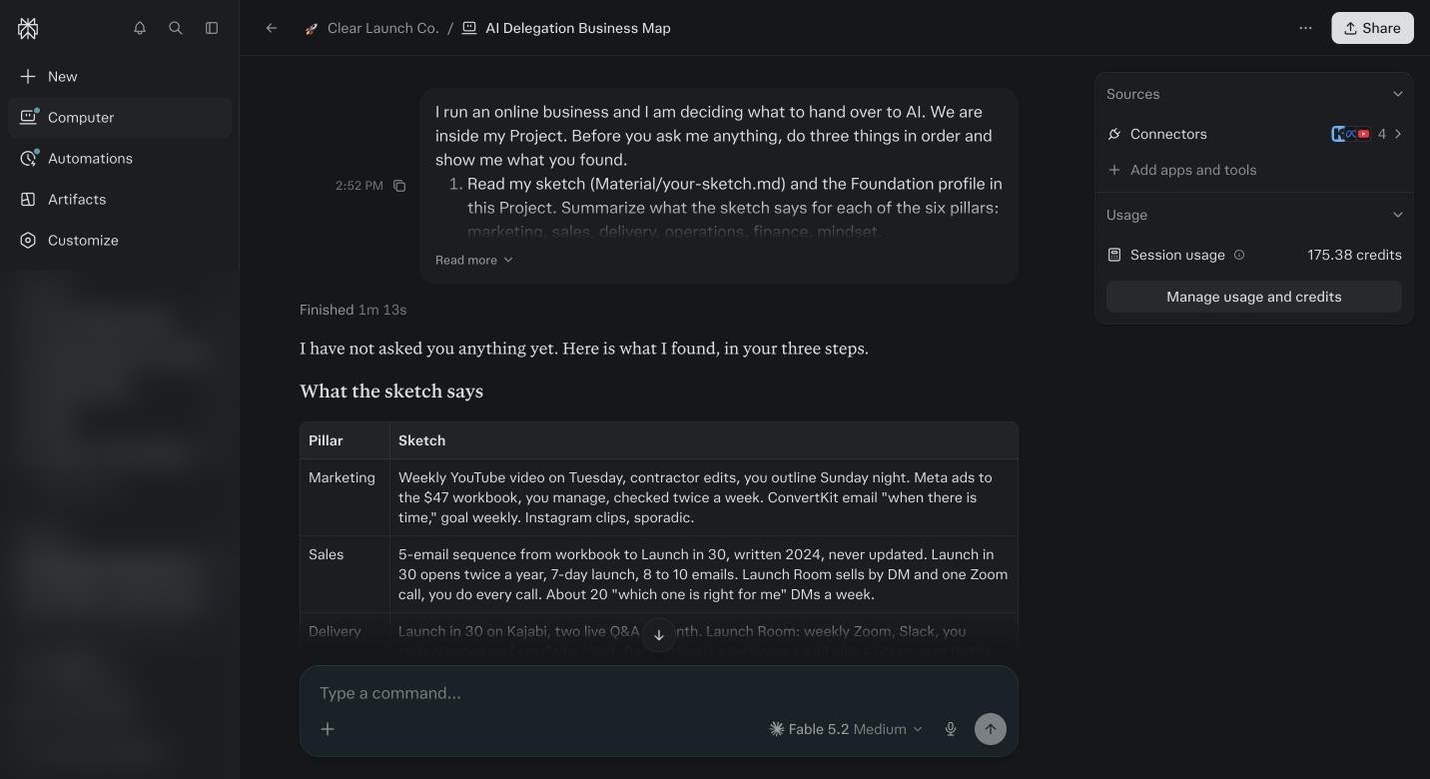
The mapping session in the demo, before it asked anything. Pillar by pillar, what the sketch says and what it found. Nothing was connected, so every number is from the sketch. When all six are done it marks each line R, N or H and asks you before marking anything H.
Then it asks you to put the R and N lines in order. One is the line that hurts most. Say it out loud if you need to. The order matters more than the list.
Apply the stage rule when it asks.
Under about ten thousand a month, keep the top two lines and park the rest. Twenty five thousand and up, the top line in each of your two busiest pillars. Everyone else, three or four lines. You can always add. You cannot un-overwhelm yourself.
It checks each chosen line for over engineering.
If a three minute phone call or a simple rule would do the job, it flags it and you cross it off. I have built things that were valuable to nobody but me. Do not copy that part.
It matches each numbered line to one of the agents installed in your Project.
If no agent fits, it writes session, which means you do that job in a plain session with Foundation’s profile behind you. Module 9 explains what each agent does, so if a match looks wrong, come back after that and change it.
Say: save the map as business-map.md in the Project files.
Open the Project files and confirm it is there. Then read the top line again. That one line is what your first agent run in module 10 is for. Everything in this course is now in service of it.
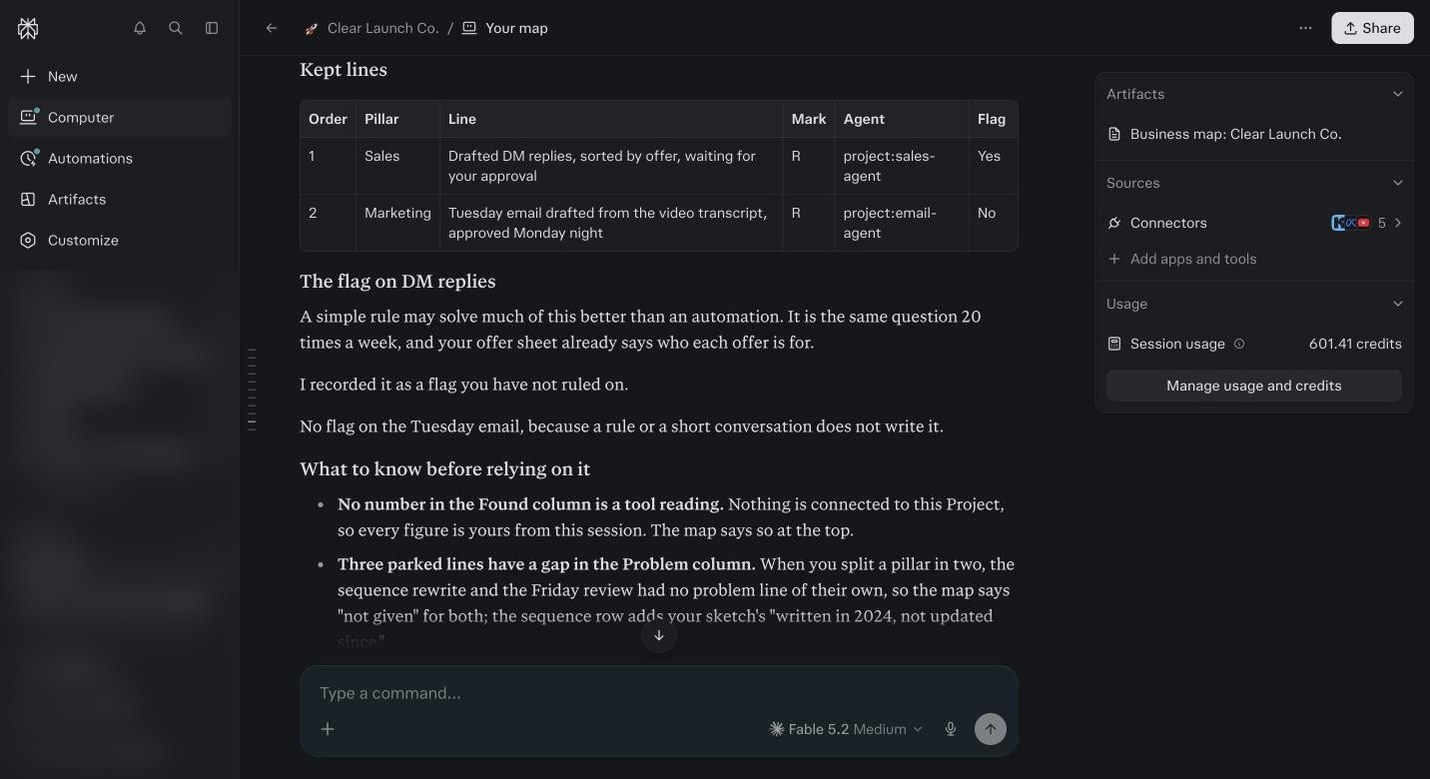
The finished map. Two kept lines with the agent attached to each, one flag Maya has not ruled on, and what to know before relying on it. 601 credits.
Before you ask
Do I need every connector done before this?
No. The ones on your sketch. If marketing is on it and Meta is not connected, it will say not connected and use your sketch for that pillar. You can rerun the session later and it updates the map.
What if its numbers disagree with mine?
Good. That is the point. Look at what it found, then decide. Most people find one pillar is smaller than they thought and one is bigger. Change the order if that happens.
Can I redo the map later?
Yes. Open the same Project, new session, paste the prompt again. It reads the old map and asks what changed. Do it at the day 30 review in module 19, and any time your business shifts.
How long should the mapping session take?
Sixty to ninety minutes if your connectors are in. It reads first, which takes a few minutes, then one question at a time. Do it in one sitting if you can. The order decision at the end needs the whole picture in your head.
What if the agent marks something human that I want to hand over?
Say so. It asks before it marks anything H, and your answer wins. The H is a suggestion based on the cost of a mistake, not a rule. Some people hand over their whole inbox. Some never will. Both are right.
Should my assistant be in the session?
For the operations and delivery pillars, yes. They know how things actually run. For the order at the end, it is your call, because it is your business and your hours.