Every Scaling Agent is a skill, and every skill is a set of instructions
Let me explain what that means before we go near the install button. A skill is a folder of instructions, reference files and rules that tells Computer how to do one job in your business the way you want it done, every time, without you explaining it again. When you ask for something that matches a skill, it loads on its own. You can also call it by name. The difference between a skill and a saved prompt is that a skill carries files, remembers rules, chains to other skills, and gets better every time you correct it.
Now the part people skip
Perplexity gives you the computer. It does not give you a way of running a business. That is what the Scaling Agents are. Twenty one agents, one per job, every one of them built on the methods I have taught for over ten years: the six pillars, the ROI Method, the three lanes, the offer ladder, the levels of consciousness. Each agent knows the method for its job, reads your Foundation before it does anything, asks before it sends or spends, and hands its work to the agent next to it. The Content Agent asks the Proof Agent for a real result. The Sales Agent reads what the Email Agent sent. None of that is in the box when you buy Perplexity.
I want to be straight about what went into them, because the zip file does not look like much. Well over $250,000 of AI compute went into building, running, breaking and rebuilding these agents on real businesses, mine and my clients. Hundreds of test installs. Thousands of corrections folded back into the rules. And underneath, a decade of methodology that used to take me a four day event to teach. What you are installing is how I would run your business if I sat in your chair, with your Foundation as the brief.
Skills live in two places
Account skills, under Skills in the left sidebar, apply everywhere. Project skills, inside one Project’s settings, apply only inside that Project. The Scaling Agents go in as Project skills. That is how one client’s agents never see another client’s business.
Here is what the install actually does
The bundle came with your install purchase, as one zip file in your welcome email. You attach it to a session inside your Project and ask Computer to install it. Your Scaling Agents 2.0 bundle, the installer puts every agent in, in one go, each with its own workspace inside the Project, so no agent trips over another agent’s files. It checks every pack against its own record, installs each one as a Project skill, then writes two files into the Project: a record of what went in, and a start here note. Then it tells you to run Foundation. It does not open a session for each agent. You do that yourself, one at a time, by saying the agent’s name. Module 10 is that step.
And you do not switch everything on at once, even if it is all installed. I once installed all of them, nineteen at the time, into a fresh Project for a made up coaching business and ran each one to see what would happen. About 11,500 credits later I had every agent running and a long list of things to fix, because every agent needs Foundation and a first look at real data before it is worth anything. So the course wakes up the core six first: Foundation, Offer, Funnel, Email, Content and Image. Everything after that gets its first read pillar by pillar, from your map, when a job calls for it.
What you do, step by step
Look at Skills once so you know the two homes.
Click Skills in the sidebar. Discover shows what Perplexity ships. Installed shows what is on your account. The Create skill button has three choices: Create with Computer, Upload skill, Upload skill to organization. You will not use this page for Scaling Agents, but you will use it for skills Computer builds for you later.
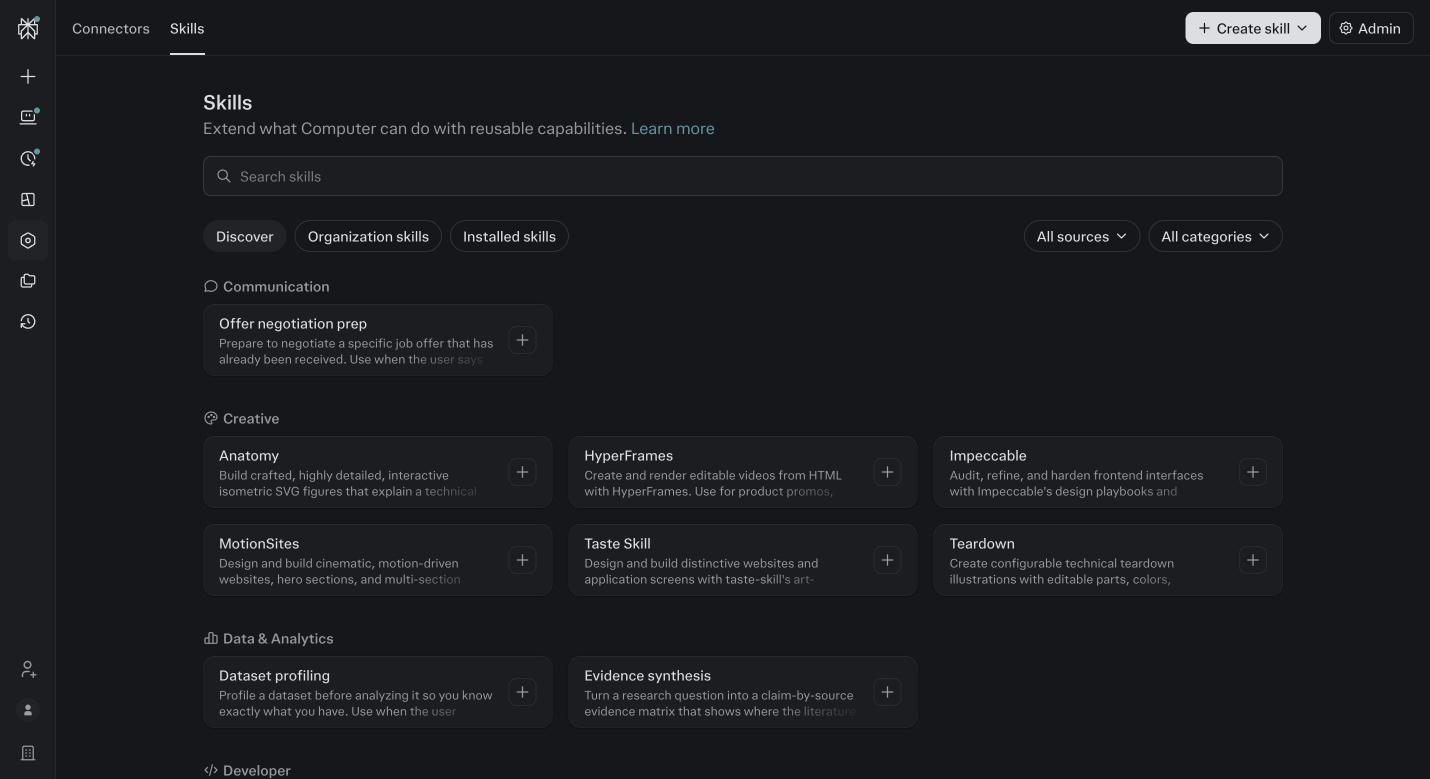
Skills, Discover tab. Skills Perplexity ships. Scaling Agents are not here, they come in a zip. Open the Create skill menu to see the upload path exists, then close it.
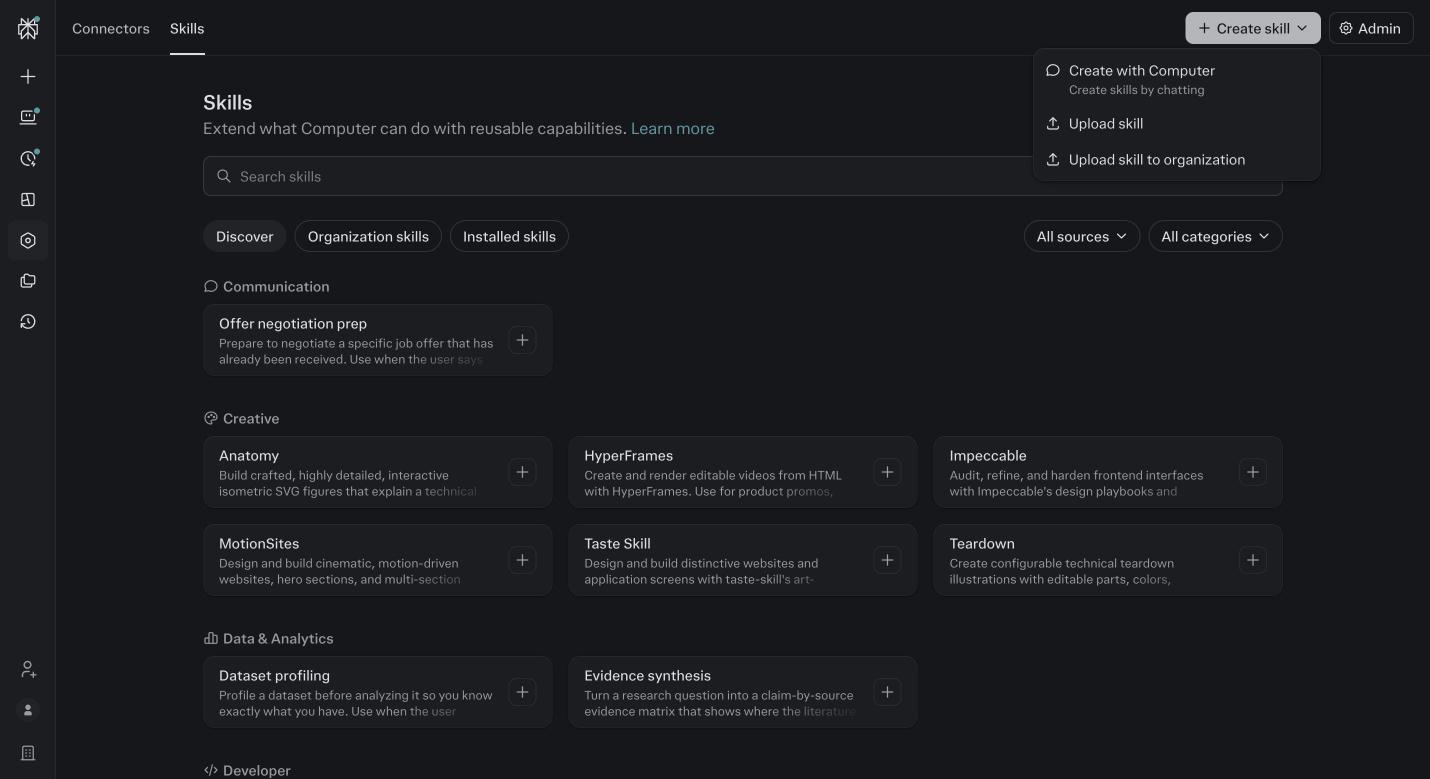
The Create skill menu. Upload skill takes a zip. Create with Computer builds one from a task you describe. If you installed the bundle in module 7, step one, skip to the confirm step below.
If you did not, download the Scaling Agents bundle zip from your welcome email. Do not unzip it. Note its version number, it is in the file name.
Open your Project.
Start a new session. Click the plus in the composer, choose Add images and files, and pick the zip.
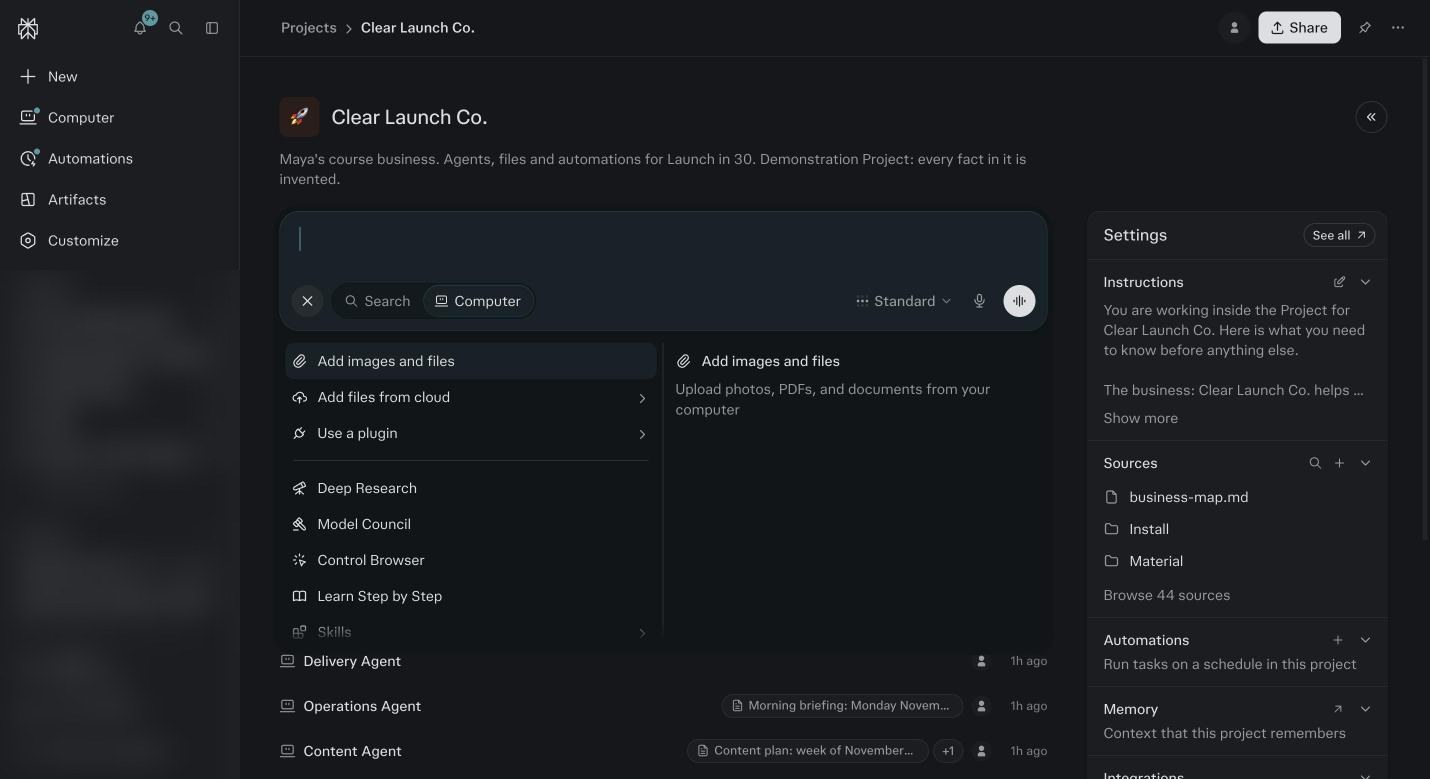
The plus menu. Add images and files is how the zip gets attached. Skills at the bottom lists what is already installed here. Type: install this bundle into this Project.
Send it. The installer lists each agent pack with its version and a check mark as it verifies. If a pack fails, it says why. Stop and read module 18 before you retry.
When it finishes it tells you two things: the install record is written, and to start with Foundation.
If Foundation has not run yet, go to module 7 and run it. Come back here after.
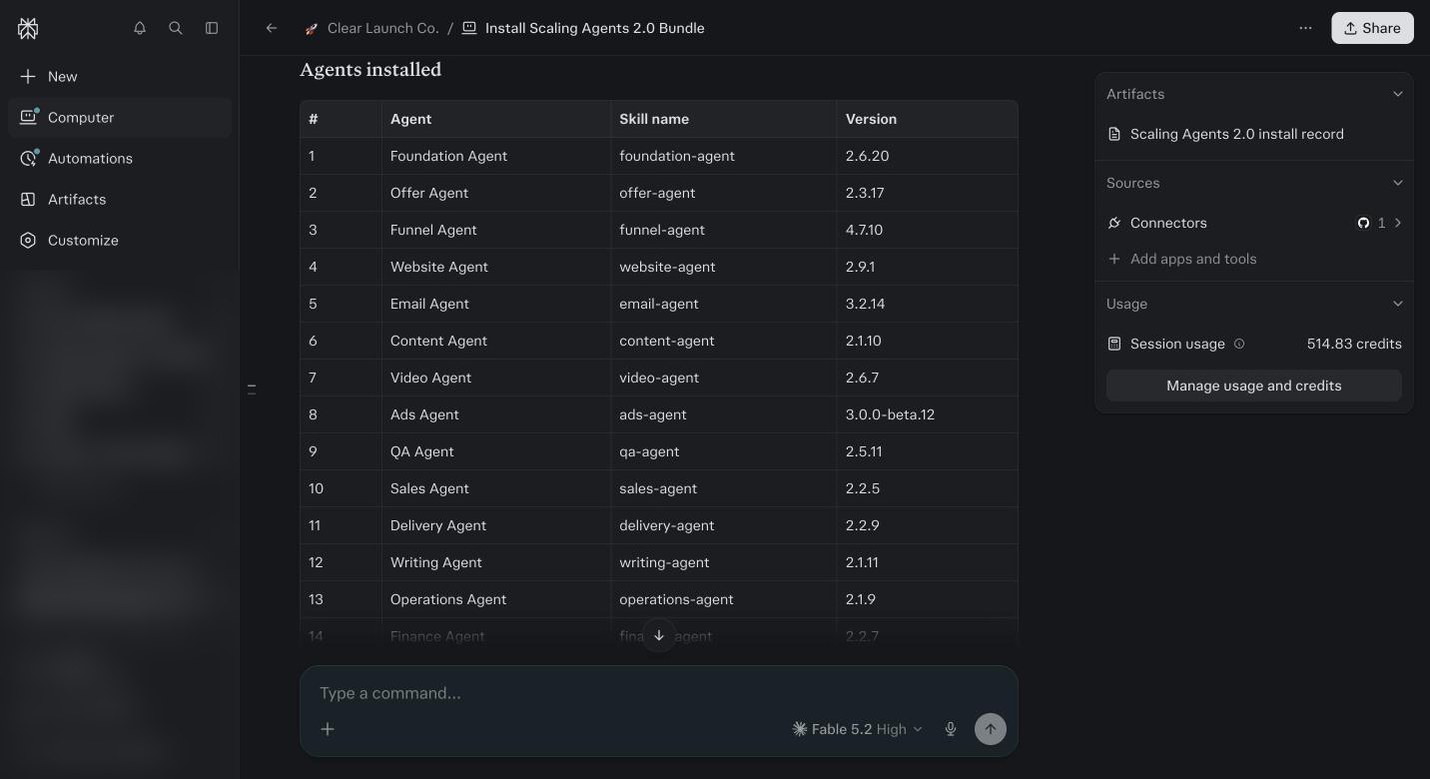
The installer finishing. Every pack verified, the install record written, and the instruction to say set up foundation. Confirm the install.
Open Project settings, then Skills. Every agent from the bundle is listed as a Project skill. Open the Project files and find the install record and the start here note.
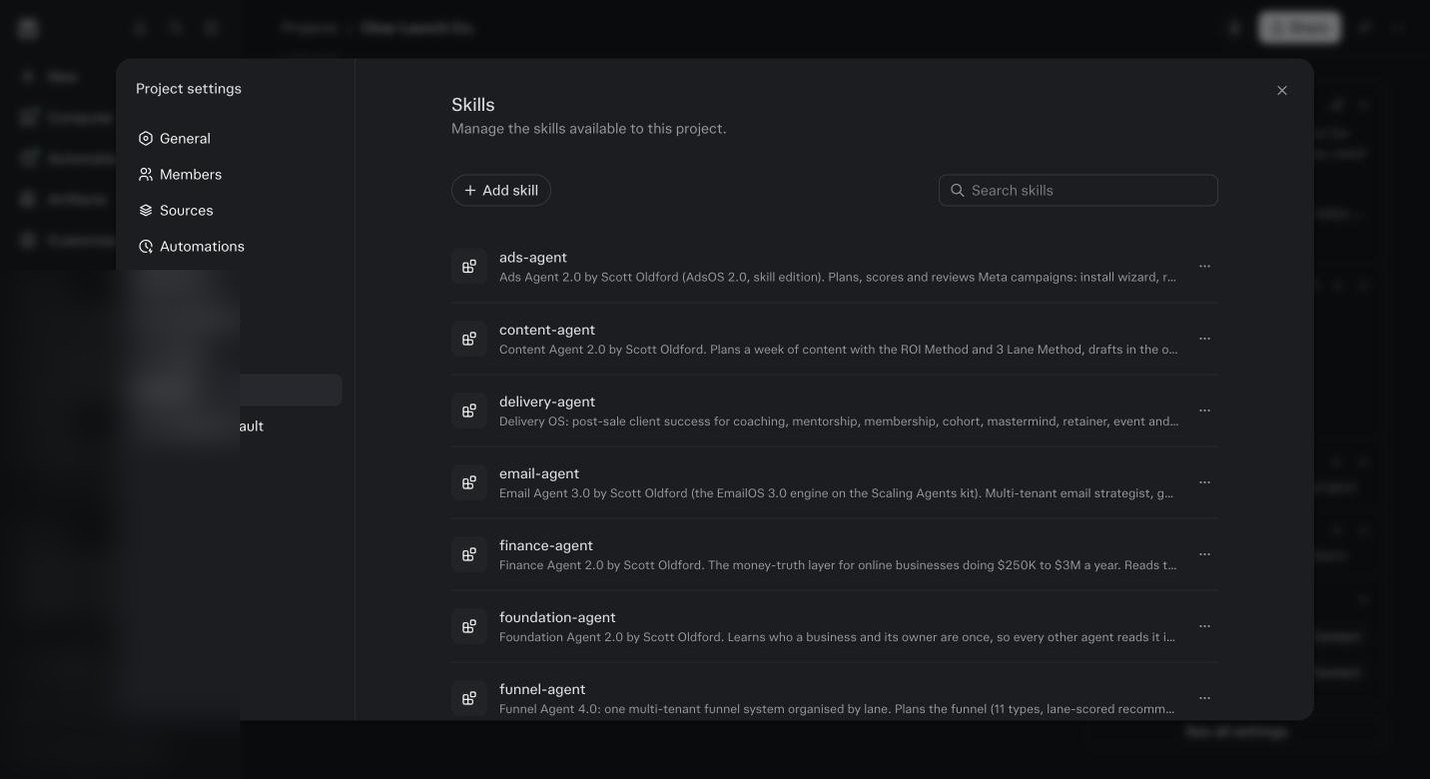
Project settings, Skills, after install. One row per agent. This is the proof it went in. Know the other door.
Project settings, Skills, Add skill opens an upload dialog that accepts a skill zip directly. If you ever receive a single agent update rather than a bundle, it goes in here.
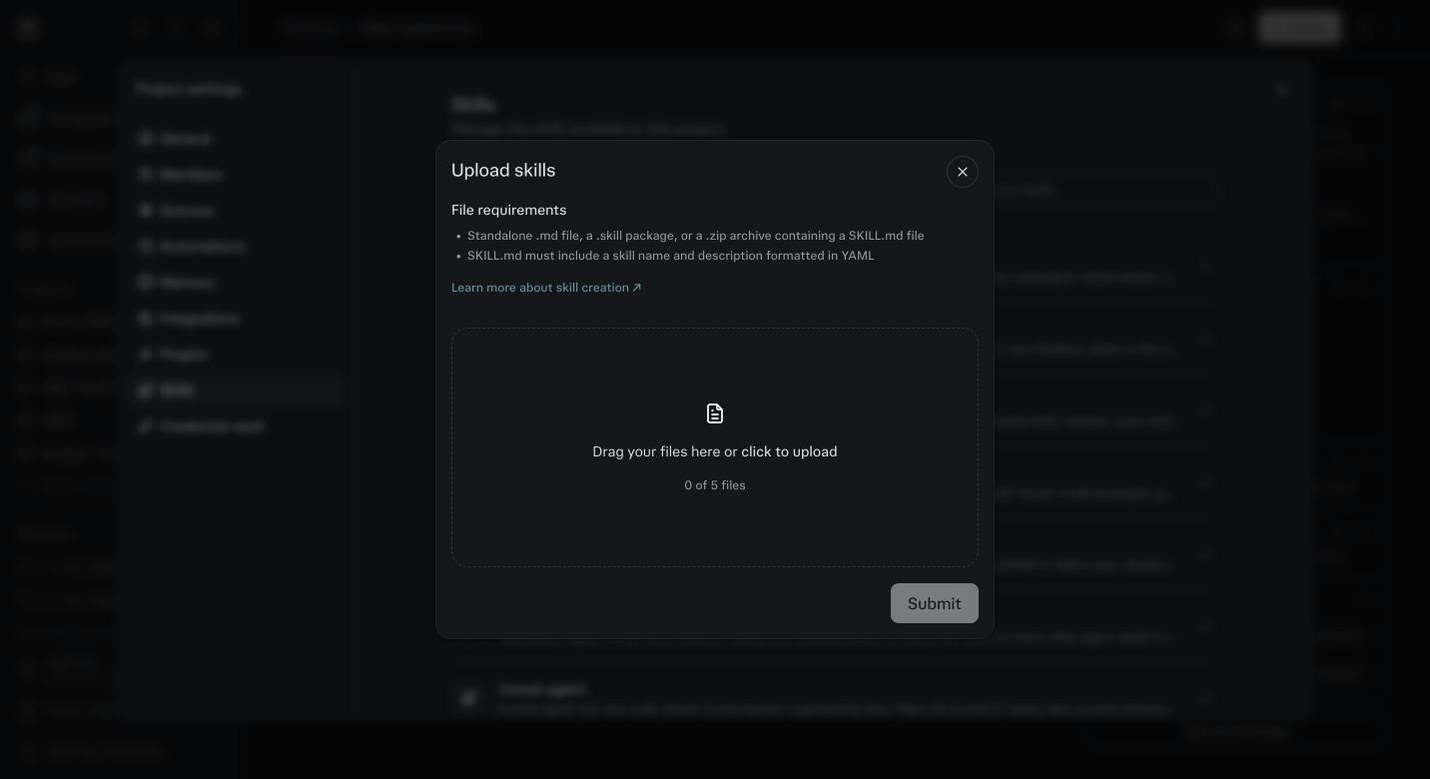
The Upload skills dialog from Project settings. Accepts .md, .skill or .zip containing a SKILL.md. For single agent updates. Read the directory below.
For each agent notice its pillar and whether it is core. Then go back to your map from module 8 and write the agent name next to each numbered line. If a line has no agent, that line gets done with a plain session, and that is fine.
What A Scaling Agent Gives You That A Prompt Cannot
It knows the method
A prompt knows what you typed. An agent knows how the job is supposed to be done. The Email Agent knows the ROI Method and where this email sits in it. The Offer Agent knows the four offer ladder. You do not have to teach it.
It reads your Foundation first
Every agent opens your business profile, your voice, your offers and your map before it writes a word. The output sounds like you and sells what you sell, on the first try, not the fifth.
It asks before it acts
Sending, spending, publishing, deleting. Every agent stops and asks. You say yes in one click. Nothing leaves without you seeing it.
It talks to the other agents
The Content Agent pulls a real client result from the Proof Agent. The Sales Agent sees what the Email Agent sent last week. Strategy reads all of them on Sunday. One business, one set of facts.
It gets better when you correct it
Tell it why something was wrong and that becomes a rule. Three weeks in, it is working the way you would, and you have stopped repeating yourself.
It runs without you
Put it on a schedule and it does the job at 7am whether you are awake or not. The result is in your inbox. That is the part that changes your week.
A Decade Of Method, Built Into Twenty One Agents
The zip is small. What is inside it is not.
- Over $250,000 of AI compute
- Building, running, breaking and rebuilding these agents on real businesses. Every rule in them was paid for by a run that went wrong first.
- Ten years of methodology
- The six pillars, the ROI Method, the three lanes, the offer ladder, the levels of consciousness. The frameworks I taught at live events for a decade, turned into instructions an agent can follow.
- Hundreds of installs
- On my own businesses, on client accounts, on made up businesses built just to break things. The installer and the approval gates came out of those.
- Thousands of corrections
- Every time an agent got something wrong and someone said why, the why went back into the rules. That is why the first output is usable.
- One shared Foundation
- Every agent reads the same profile, so the twenty one of them act like one team that has worked for you for years, instead of twenty one strangers.
- Updates for as long as you have them
- When an agent gets better, you get the new pack. Project settings, Skills, Add skill, and the new version replaces the old one.
Every agent in the bundle
| Agent | Pillar | Core or add on | What it does for you |
|---|---|---|---|
| Foundation | All | Core | The context layer every agent reads. Interview plus your files, writes the profile. |
| Offer | Marketing | Core | Offer ladder and positioning from the Foundation profile. Writes the offer spec the Funnel and Email agents read. |
| Funnel | Marketing | Core | Funnel specs and builder handoffs for opt ins, quizzes, applications, bumps and upsells. Asks for a credit ceiling before it builds. |
| Marketing | Core | Campaigns, sequences and delivery to your email platform. Drafts in your voice, loads with your approval. | |
| Content | Marketing | Core | Source led content plans and drafts from your calls, videos and writing. Hands visuals to Image and emails to Email. |
| Image | Marketing | Core | Brand render, carousels, quote cards and ad statics in your brand card. |
| Website | Marketing | Add | Site and page builds from brand and offer. |
| Video | Marketing | Add | Video scripts, cut lists and production handoffs. |
| Ads | Marketing | Add | Meta ad creation, scoring and optimization from your ad account. |
| Writing | Marketing | Add | Long form and book writing in your voice. |
| Visibility | Marketing | Add | Podcasts, PR and getting seen. |
| Sales | Sales | Add | Pipeline, follow up, DM replies and inbound triage. |
| Proof | Sales | Add | Testimonials and proof capture, with permission tracking. |
| Delivery | Delivery | Add | Client onboarding, delivery tracking and the work log. |
| QA | Delivery and Operations | Add | Checks on pages, funnels and deliverables before they ship. |
| Operations | Operations | Add | Daily operations, briefings and the inbox. |
| Intimacy | Delivery and Sales | Add | Everything after the sale: welcome and activation, billing rescue, refunds and cancels, churn watch, personal touches and reactivation. Drafts first, you approve every send. |
| Outreach | Sales | Add | Reaching people one at a time before they are a conversation: who to contact, what you know about them, the first message and the follow ups, in warm, network and cold lanes. Never sends without your yes. |
| Strategy | Mindset and all | Add | Six pillar scoring and diagnosis. The agent that tells you what to fix first. |
| Mindset | Mindset | Add | Mentor conversations that know your patterns. Tells you what a session costs before it starts. |
| Finance | Finance | Add | Weekly transaction review, books sync and the questions it cannot answer alone. |
Core rows go in first. Add rows come in by pillar, from your map, when a job calls for them.
Before you ask
What happens if I install the zip twice?
Nothing bad. The installer checks its own record, updates what changed and leaves the rest alone.
Can I install on Claude or ChatGPT?
No. The bundle is built for Perplexity Computer: Project skills, Project files, connectors and automations in one place. That is the reason this course lives here.
What if an agent I want is not in the bundle?
Do the job in a plain session with Foundation behind it. If you do it well twice, ask Computer to turn it into a skill. That is how most of these started.
Why not just write good prompts myself?
You can, and you will still get generic work, because a prompt does not know your business, your voice, your method or the approval rules. An agent reads Foundation, follows a method, asks before it acts and gets better when you correct it. A prompt does none of that.
How are these different from the skills Perplexity ships?
Perplexity’s skills teach Computer how to use a tool. These teach it how to run a part of your business: the method, the order, what good looks like, when to ask. They were built on real businesses over a decade and they read your Foundation first.
Do I have to install all of them?
With the full 2.0 bundle they all install in one go, each with its own workspace. You still only wake up the core six first. An installed agent that has never run costs nothing.
What does core versus add on mean?
Core are the six every business needs on day one: Foundation, Offer, Funnel, Email, Content and Image. Add ons are for a pillar that is on your map: Sales, Ads, Operations, Finance, Intimacy, Outreach and the rest. The directory below marks each one.
How do updates work?
When an agent gets better, you get the new pack. Project settings, Skills, Add skill, and the new version replaces the old one. Your corrections and rules in that agent’s workspace stay.
Can I use these for client businesses?
Yes. One Project per client, the bundle installed in each, Foundation run for each. Nothing crosses between Projects. That is what agencies in the program do.
What if the installer says a pack failed?
Download the zip again from the link in your welcome email and check the version in the file name. Attach it fresh in a new session and run the install again. If the same pack fails twice, send us the installer output. Module 18 has it in the fix table.
There are a lot of agents. Which one do I install next?
Install the bundle once, all of it, then stop looking at the directory. Open your map from module 8. The top line names the agent. That is the only one you run this week. The directory is for later, when the first one is earning its keep.