Here is what you will have when this is done
Let me start with the basics, because I am not going to assume you know any of this. Perplexity is an AI tool. Most people know it as a smarter search box. The part we use in this course is called Computer, and Computer does work for you: it reads your email, your calendar, your ad account and your files, and it runs jobs on its own while you do something else. To get the most out of Computer you need the Max plan, which is Perplexity’s top monthly subscription. More on that in the next module.
On top of Perplexity, I give you a set of agents I built, called the Scaling Agents. An agent is just a set of instructions that teaches Computer to do one job in your business the way you would, every time. There is one for email, one for ads, one for content, one for sales follow up, and so on. You will meet them all in module 11.
So when you finish this course you will have five things
A Perplexity Max account with your business tools plugged in. A written plan of which jobs in your business you are handing to AI, and in what order. A profile of your business that every agent reads before it does anything, which is built by an agent called Foundation. The Scaling Agents installed and running. And a few jobs running on a schedule without you. Then I give you a 30 day rhythm so it keeps working after the excitement wears off.
Almost everyone who struggles with this skipped the boring part
They installed agents before plugging anything in, or they never decided what the agents were for, and then they were surprised the output felt generic. So the order in this course is the order. Settings and your plan first. Plugging in your tools second. Your business profile third. Agents after that.
The words you will see in this course
- Perplexity
- The AI tool this whole course runs on. You use it in your web browser, and later on your computer and phone.
- Computer
- The part of Perplexity that does work for you. It reads your tools, runs jobs on its own, and runs the agents.
- Max
- Perplexity’s top monthly plan. The course assumes you are on it.
- Credits
- How Perplexity counts the work Computer does. 100 credits is one dollar. Max includes 10,000 a month.
- Agent
- A set of instructions that teaches Computer to do one job in your business your way. The Scaling Agents are the set I built for you.
- Foundation
- The first agent. It learns your business and writes the profile every other agent reads.
- Project
- A folder inside Perplexity that holds your sessions, files, instructions and scheduled jobs for one business.
- Session
- One conversation with Perplexity. Each agent works in its own session.
- Connector
- A permission that lets Perplexity read and act in one of your tools, like Gmail or Meta, after you log in once.
- API key and Credential vault
- Some tools have no login screen for this. They give you a long code called an API key, and the Credential vault is the locked box in Perplexity where you keep it.
- Skill
- The technical name for an agent inside Perplexity. A folder of instructions that loads when you ask for that job.
- Automation
- A session that runs itself on a schedule you set, like every weekday at 8am.
- Model
- The AI engine doing the thinking. Perplexity offers several, and Computer picks one for you unless you choose.
- Brain
- Perplexity’s deeper memory, Max only, that connects what you did across sessions.
- Comet
- Perplexity’s own web browser. It lets Computer use websites that have no connector.
- Your sketch
- The one page you fill in by hand in module 3: six pillars, what hurts in each, your first guess at what AI could take.
- Your map
- The written plan the AI builds with you in module 8, from your sketch and your real data, of which jobs move to AI and in what order.
This Is What We Walk You Through
- ●Start hereSee what your setup looks like when it is finished, how many hours it takes, and the answers to the questions most people ask before they begin.
- 1AccountPick the Max plan, turn it on, and tie it to your install so your credits and your agents live in the same account.
- 2SettingsTurn on the eight settings the agents need, once, so they remember you and write the way you want.
- 3Your sketchPut your business on one page. Six pillars, what hurts in each, and what you want instead. No AI yet. This is the frame everything else hangs on.
- 4ConnectorsLog your business tools into Perplexity the right way, so the agents can read your real numbers and emails instead of you pasting them in.
- 5Your contextPull what ChatGPT or Claude already knows about you and your business, and load it into Perplexity so you do not start from zero. Lite in an evening, or the full kit across a week.
- 6ProjectsCreate one Project for your business, understand every panel and setting in it, load your instructions and files, and know the layout for solo, agency and team.
- 7FoundationUnderstand what Foundation is, the six parts it covers and the engines inside it, pick Light, Regular or Full, install the bundle, and run the interview.
- 8Your mapTurn your sketch into a working map inside your Project. The AI reads your profile and your real tools, checks your answers, and matches each line to an agent.
- 9Scaling AgentsUnderstand what the Scaling Agents are, why they exist, install the bundle into your Project, and know what each agent does.
- 10First readsRun each agent for the first time on your real data, correct what it gets wrong, and see how it asks before it sends anything.
- 11Your agentsMeet every agent through one business. For each one: the situation, what you say, what comes back, and what you do with it. Then the first three prompts to give each one.
- 12Agents togetherSee how the agents pass work to each other, what they share, what stays separate, and what a week looks like when they run as one team.
- 13ModelsLearn the four effort levels and the ten models, which to use for which job, what to expect from each, and how much the choice changes the bill.
- 14MemoryUnderstand Memory, Brain, Project Brain and your Foundation as four layers, test each one, correct a wrong memory, and decide what it should never keep.
- 15AutomationsSet up your first two scheduled jobs so the agents run on their own, ask before they act, and stay cheap.
- 16SurfacesUnderstand the four places Computer can work, when each one is the right tool, how to tell Perplexity which to use, then install them and finish one real task on each.
- 17CostsKnow what a credit is worth, what the common jobs cost, what setup and a normal month cost for a business like yours, and the three habits that keep the bill down.
- 18FixesFind and fix the things that go wrong, most in under five minutes, and know when to hand it to us instead.
- 19First 30 daysTurn the install into a weekly habit, and run the day 30 review that decides what you keep, change and add.
What you do, step by step
Read the module map in the sidebar once, top to bottom, so you know what is coming.
Nineteen modules after this one.
Look at what a finished Project looks like below.
One Project for the business. One session per agent, named for the job it does. That is where you are headed.
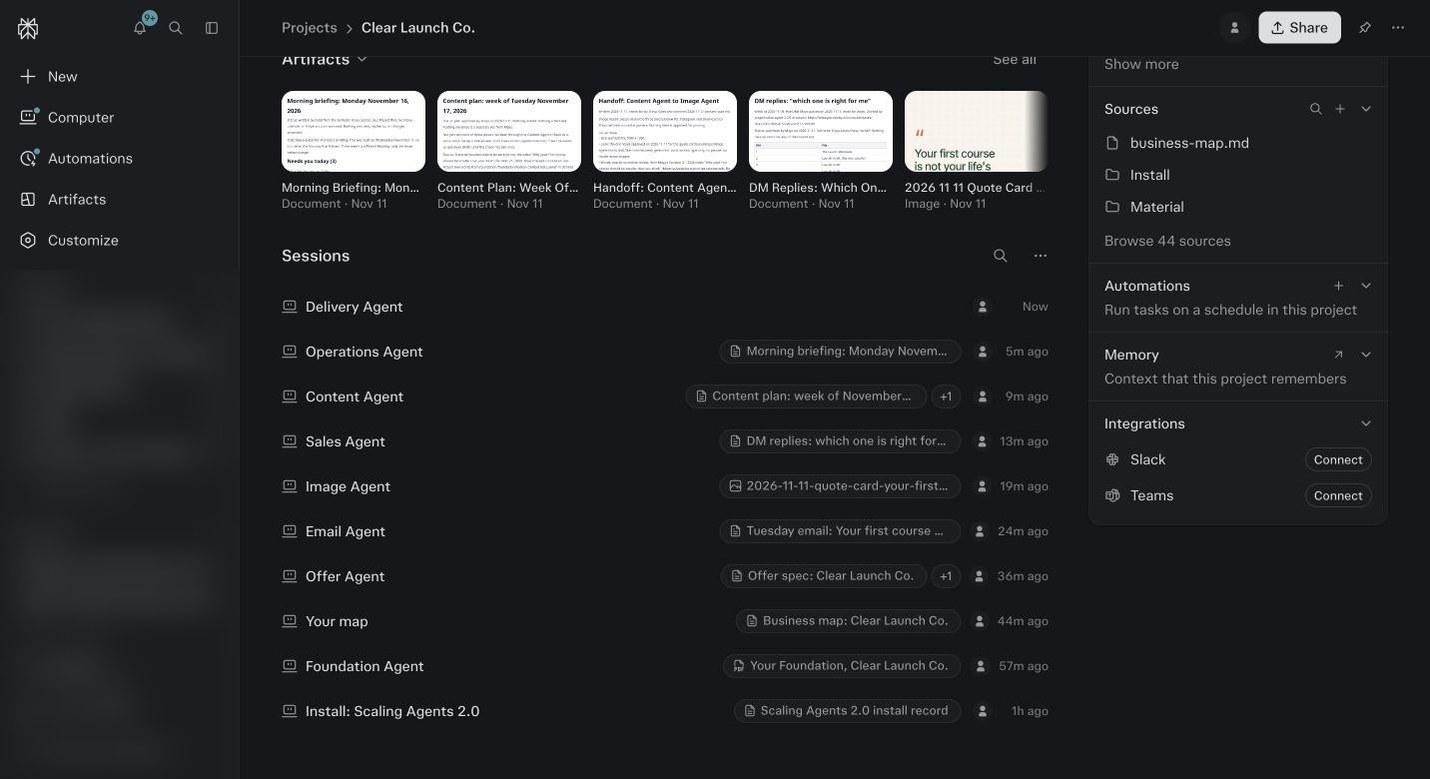
A finished Project in a demo account. Each row is one agent working in its own session. Set aside three blocks this week.
One for modules 1 to 5, which is account, settings, your sketch, connectors and context. One for modules 6 to 12, which is the Project, Foundation, your map, the agents, their first reads and how they work together. One for modules 13 to 19, the controls and the rhythm.
Tick the done when box at the bottom of each module as you finish it.
That checklist is your progress.
Before you ask
Which plan, and do I need Computer?
Max, and yes. Computer is the part of Perplexity that actually does the work, and every module here uses it. Pro gets you in the door but has no monthly credits, so you will run dry fast.
What is a skill, and how do I install one?
A skill is a folder of instructions that teaches Computer to do one job your way. You install it from a zip inside your Project, or ask Computer to build one from a job you just did well. Module 9 walks you through it.
How do I give it my business, my voice, my ChatGPT history?
Give it real material, not descriptions. Your best writing, your offers and prices, a few testimonials, and the export from ChatGPT or Claude in module 5. Foundation turns all of that into your profile.
Which connector, API key or browser login do I use?
If the tool has a connector, use that. If it only gives you an API key, that goes in the Credential vault. If it has neither, Comet drives the website for you. Module 4 has a card for each tool.
What should the agents actually do for me?
The weekly work you should not be doing by hand. Email writes your emails in your voice. Content turns your calls into posts. Ads tells you what to kill and what to scale. Sales drafts your follow ups. Module 3 is where you pick which ones you need first.
How long does setup take and what does it cost?
Doing it yourself is eight to ten hours across a week. Managed is three to four hours of pre work, then one 60 minute session. Installing the bundle costs a few dollars in credits. The first reads and Foundation are where setup money goes. After that it depends on what you run on a schedule. Module 17 has real numbers.
Can it read my email and act on its own? Is it reversible?
It reads only what you connect. Anything that sends, spends or changes something outside Perplexity stops and asks you first. You decide which jobs run alone. You will see your first approval prompt in module 10 and say no to it on purpose.
One account or several, and how do clients stay separate?
One account, one Project per business or client. Nothing inside a Project leaks into another one. If you have a team, each person needs their own account. Shared logins break the connectors.