Foundation tells every agent who you are
This module gives each agent what it works on.
Here is what happens
The Email Agent reads your lists, your campaigns and your recent sends. The Ads Agent reads your Meta account and your recent results. The Content Agent reads your YouTube, your Drive and your Zoom recordings. The Sales Agent reads your calendar, your Gmail and your CRM. Each one does this the first time you run it, using the tools you plugged in back in module 4. I call that the first read, and every agent gets one before it does any real work.
Why it matters this much
An agent with Foundation but no first read knows who you are and nothing about what is going on this week. It will write a good email to a list it has never seen. The first read is where it stops being a clever stranger and becomes someone who has looked at your actual numbers. One real look at your own data, with figures you recognize. That is the result I have been building toward this whole course, and it lands here.
Three things happen for the first time in this module
You will see an approval prompt. Anything that would send, spend or change something outside Perplexity stops and asks you first. I want you to watch one and say no, so you know what it feels like. You will correct an agent for the first time, and watch it save the correction. And you will start the one habit that matters most: one agent, one job, one session. When the job changes, start a new session. Long sessions cost more on every message and they stall more.
Start with the agent on the top line of your map, not the one that sounds most exciting. The one attached to the line that hurts most. Then work down the core six. Fifteen to twenty five minutes each, and you do not have to do them all in one sitting.
What you do, step by step
Open your Project.
Start a new session. Type the agent’s name with set up in front: set up offer agent, set up email agent, set up content agent. The agent introduces itself, confirms it can see Foundation, and tells you what it is about to read.
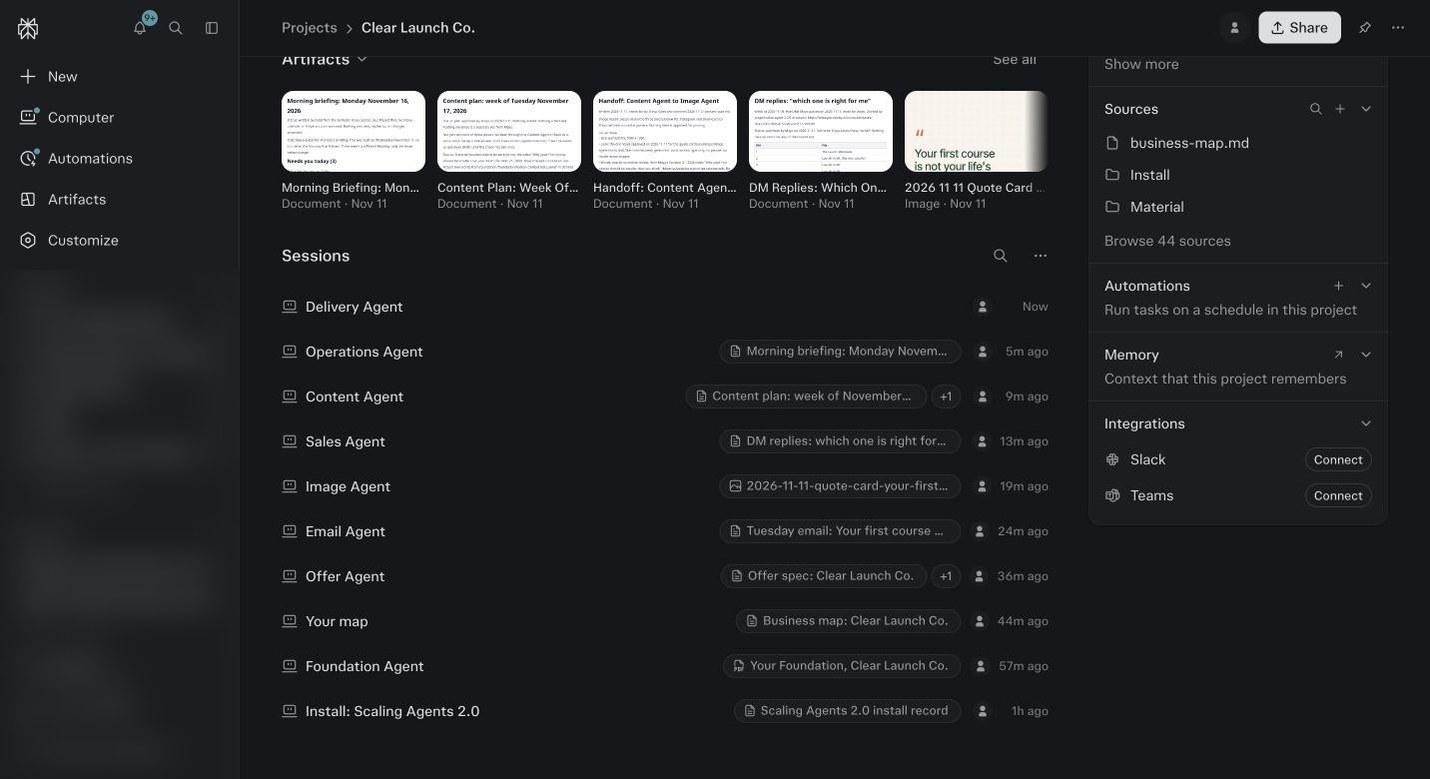
A Project after first reads. One session per agent, named for the job. Name yours the same way as you go. Let it read.
It will list what it found in your connected tools: list sizes, recent campaigns, ad spend, calendar load, whatever its pillar is. Where there is no connector for its job, it asks you for the file or the numbers. Give it the real ones.
Read the read out slowly.
Where it is wrong, say so in plain words: that list is my old list, the main one is called X. It corrects and saves the confirmed read to the Project. Do not accept a read out you have not checked. Everything the agent does next is built on it.
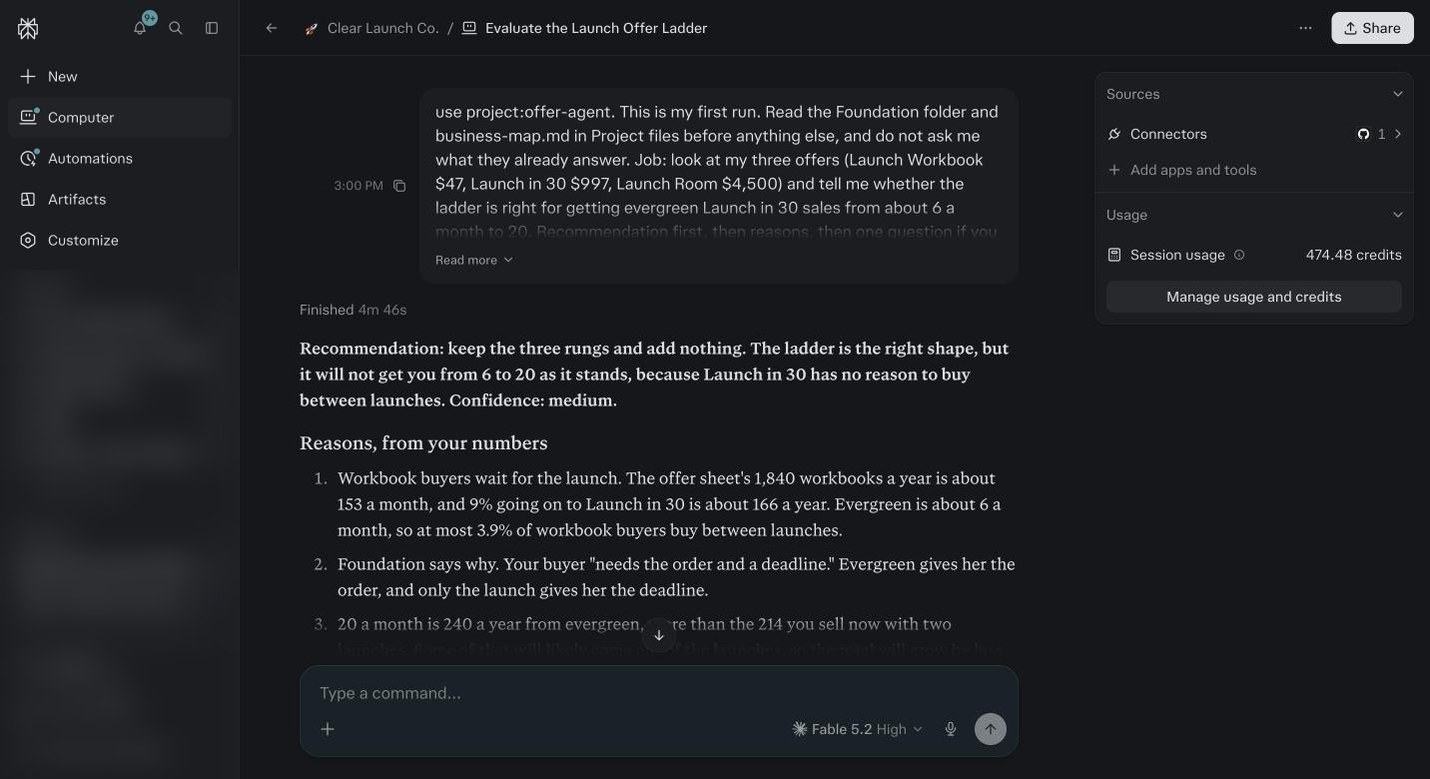
The Offer Agent on its first run in the demo. Recommendation first, then the reasons from Maya’s own numbers, then one question. It read Foundation and the map before it said anything. Give it the top line from your map.
Say: here is the problem I want you on, and paste the line. Ask it what it needs from you to do that job and what it will do on its own. Write down what it says it needs. That list is your five percent.
Ask it to do one small real thing that touches the outside world.
Draft and schedule a test email to yourself. Create a draft post. Set up a test campaign in Meta, paused. Watch it stop and ask before it does it. That pause is the approval gate.
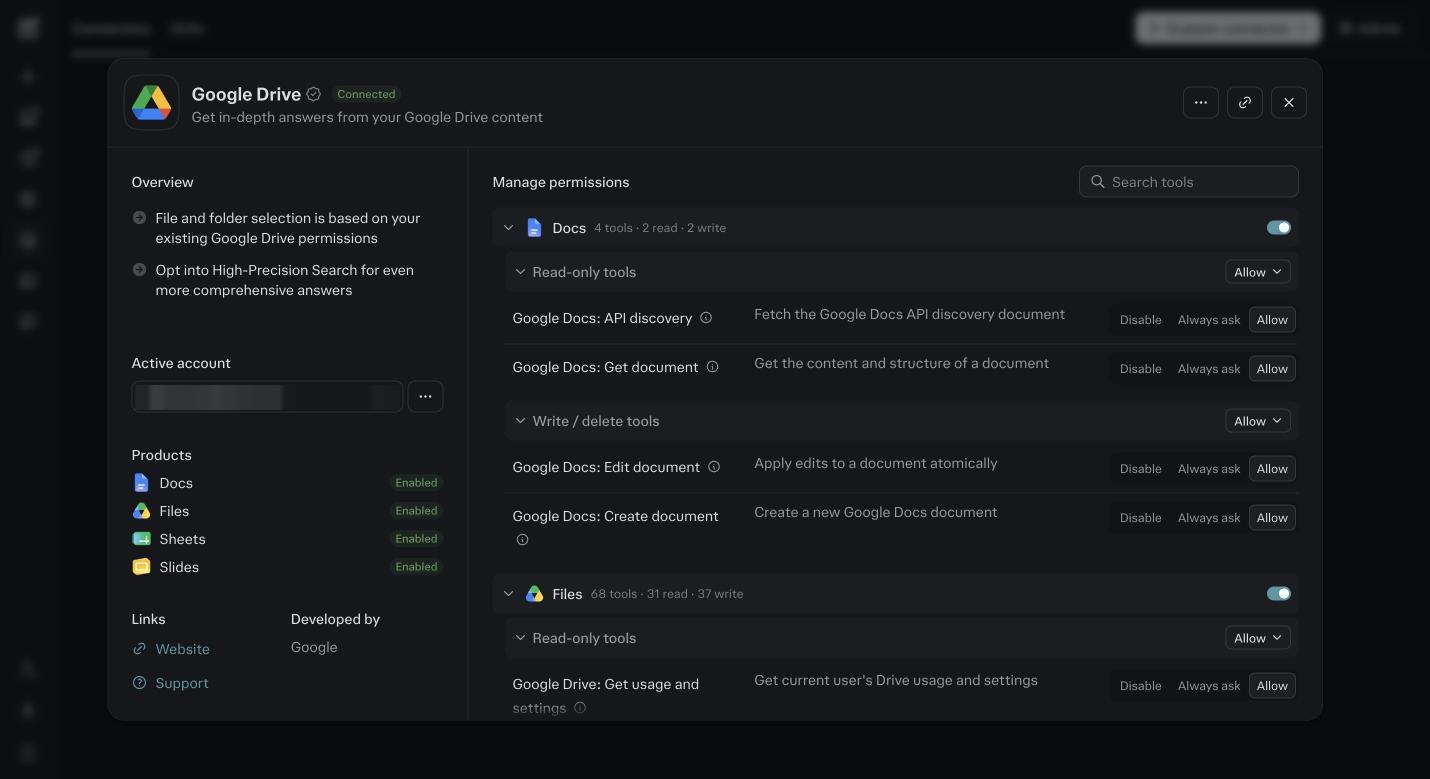
The Drive connector’s permission screen. This is where the approval prompt comes from. Every action is set to Disable, Always ask or Allow, and anything that writes starts on Always ask. Say no.
Tell it: do not send that, I was checking the gate. Then look at what it drafted anyway. That draft is your first real output, and the quality of it tells you how good Foundation is.
Rename the session for the job if the agent did not already: Offer Agent, Email Agent.
Then start a new session for the next agent. Do not run two agents in one session.
Repeat for each core agent attached to a line on your map.
If an agent has no line, skip its first read for now. You can run it the day you need it.
How A First Read Goes, Every Time
Read
The agent lists what it found in your tools. List sizes, campaigns, spend, calendar load, open invoices. If a tool is not connected, it asks you for the file or the numbers instead.
Check
You read the read out against the tool itself. Open your email platform, open Ads Manager. Do the numbers match? Same account, same date range?
Correct
Where it is wrong, say so in plain words and say why. That list is the old one. The main offer is the $2,000 one, not the $500 one. The why is what it saves.
Confirm
When it is right, say: that is correct, save it. The agent writes the confirmed read to the Project so it never has to ask again, and so the other agents can see it.
Brief
Give it the line from your map. Here is the problem I want you on. It tells you what it needs from you and what it will do on its own. Write that list down.
Name
Rename the session for the job: Email Agent, Sales Agent, Operations Agent. Start a new session for the next agent. Never two agents in one session.
The Core Six And Their First Reads
| Agent | Reads first | Asks you for | A good read looks like |
|---|---|---|---|
| Foundation | Your Material folder, your sketch, your website. | The interview answers from module 7. | The profile summary sounds like you and the offers and prices are right. |
| Offer Agent | Foundation, your map, your sales pages. | Your current prices and what sells most. | It names your offers, your prices and the one that makes the most money, correctly. |
| Funnel Agent | Your website, your opt in and sales pages, your email platform’s forms and automations. | The link to each page and which traffic goes where. | It draws your current path from stranger to buyer and names the step where people drop. |
| Email Agent | Your email platform: lists, tags, recent campaigns, open and click rates, automations. | Which list is the main one and your last three best emails. | List sizes match the platform. It knows which campaign went out last and how it did. |
| Content Agent | YouTube, your Drive, your Zoom recordings, your last month of posts. | Which channel comes first and what you never want to post. | It lists your last ten pieces with dates and can name the three topics you return to. |
| Image Agent | Your brand profile from Foundation, your logo and photos, your recent graphics. | Three graphics you liked and one you hated. | It describes your look in your words and the first image it makes does not need a redo. |
| Sales Agent, add on | Your calendar, Gmail, your CRM, your booking tool. | Which stages a lead moves through and what a qualified one looks like. | It names your open leads and how long each has been waiting. |
| Ads Agent, add on | Your Meta ad account: campaigns, spend, results for the last 30 days. | Your target cost per lead or sale. | Spend and results match Ads Manager for the same dates. |
| Operations Agent, add on | Your inbox, calendar, task tool and Drive. | What counts as urgent and who you always reply to. | It sorts yesterday’s inbox into reply, read and ignore and gets the urgent ones right. |
| Finance Agent, add on | QuickBooks or your bank export, Stripe, your invoices. | Your monthly fixed costs and what a good month looks like. | Last month’s revenue and costs match your books within a few dollars. |
Before you ask
The agent read the wrong account.
Open Connectors, then Connected, and look at the card for that tool. The email on the card is the account it reads. Remove it, connect the right one, and ask the agent to read again.
It asked me for things that are in Foundation.
Tell it: that is in the Foundation profile, read it first. If it still asks, the profile is missing that fact. Add one line in the Foundation session and move on.
How do I know if the read out is good?
The numbers match what you see in the tool. List size, open rate, ad spend, call count. If they look strange, it is on the wrong account or the wrong date range. Ask it which.
Do I have to do all six in one day?
No. One or two a day across the week is better. You will correct each one more carefully when you are not rushing, and the corrections are the point.
What if an agent has nothing to read because I have no data yet?
Say so. Tell it: there is no list yet, start from Foundation. It will build from your profile and your map, and read the real data when it exists. New businesses run this way for the first month.
It drafted something before I said yes. Is that a problem?
No. Drafting costs a few credits and sends nothing. Sending, spending and publishing are what it asks about. A draft you did not ask for is a sign it understood the job, and you can delete it.
Why did it not stop and ask?
Either that tool’s write action is set to Allow in the connector, or the instruction did not say to ask. Open Connectors, open the tool, set every write action to Always ask. Then try the test again.
Can I run two agents in one session to save time?
Do not. They will share a history, cost more on every message, and start answering each other’s jobs. One agent, one session, named for the job. It is the cheapest habit in this course.
How long until an agent is actually useful?
Usually the third run. First read, first correction, then it is doing the job the way you would. If it is still generic on run five, Foundation is thin on voice. Add five of your emails to Material and tell Foundation to update.