Every answer comes from a model, and Computer picks it for you
A model is the AI engine doing the thinking. Perplexity gives you access to several, from different companies, and by default Computer chooses which one to use for each step of a task. You set an effort level and it picks the model and how hard it thinks. For most of what the agents do, that default is right. The agents were built and tested on it.
The control is the model button at the bottom of the box where you type. Click it and you get a slider with four settings: Light, Standard, High and Ultra. Light is for simple everyday tasks. Standard balances quality and cost. High is for harder analysis. Ultra is maximum effort for big open ended problems, and it is the one marked highest usage. Lower settings use cheaper models. That is the whole slider.
Below the slider is Custom
Custom lets you pick the exact model and how much reasoning it does. For the GPT models there is also a speed setting, and faster costs more credits. Ten models are on the list as I write this, and the names change every few weeks. Between the first draft of this page and the final one, three days apart, two names changed and one model was added. So I am teaching you where the control is, what each model is good for right now, and how to think about the trade, so the next name change does not matter.
My rule. Foundation, Offer, Funnel and anything that writes in your voice gets High or Ultra. Briefings, sorting and quick reads get Light or Standard. Scheduled jobs are where you have to be careful, because a daily job at Ultra adds up, and each one carries its own setting. Last week on my own account almost every credit went to Claude Fable at high reasoning. That is right for building products, and wrong for reading your inbox every morning.
What you do, step by step
Open the composer in your Project and click the model button at the bottom right.
It shows the current preset and the model behind it. Move the slider through Light, Standard, High and Ultra and read how the description under it changes.
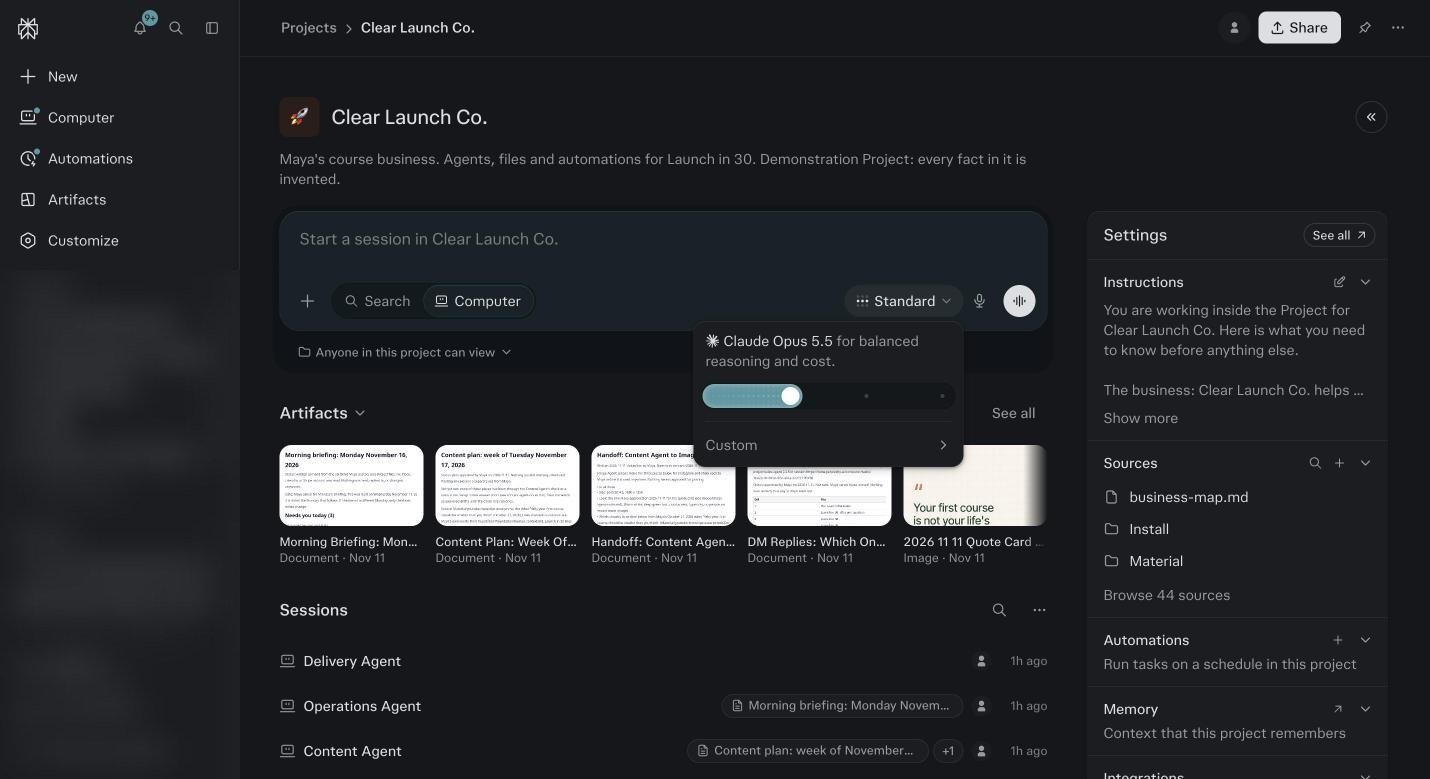
The model picker. The slider sets the effort level. The line under the slider explains what that setting does and how many credits it uses. Click Custom.
You see two rows: Model and Reasoning. Click Model to open the list of ten. Each has a provider icon. Pick one and the composer label changes to that name. Click Reasoning to see the levels that model supports.
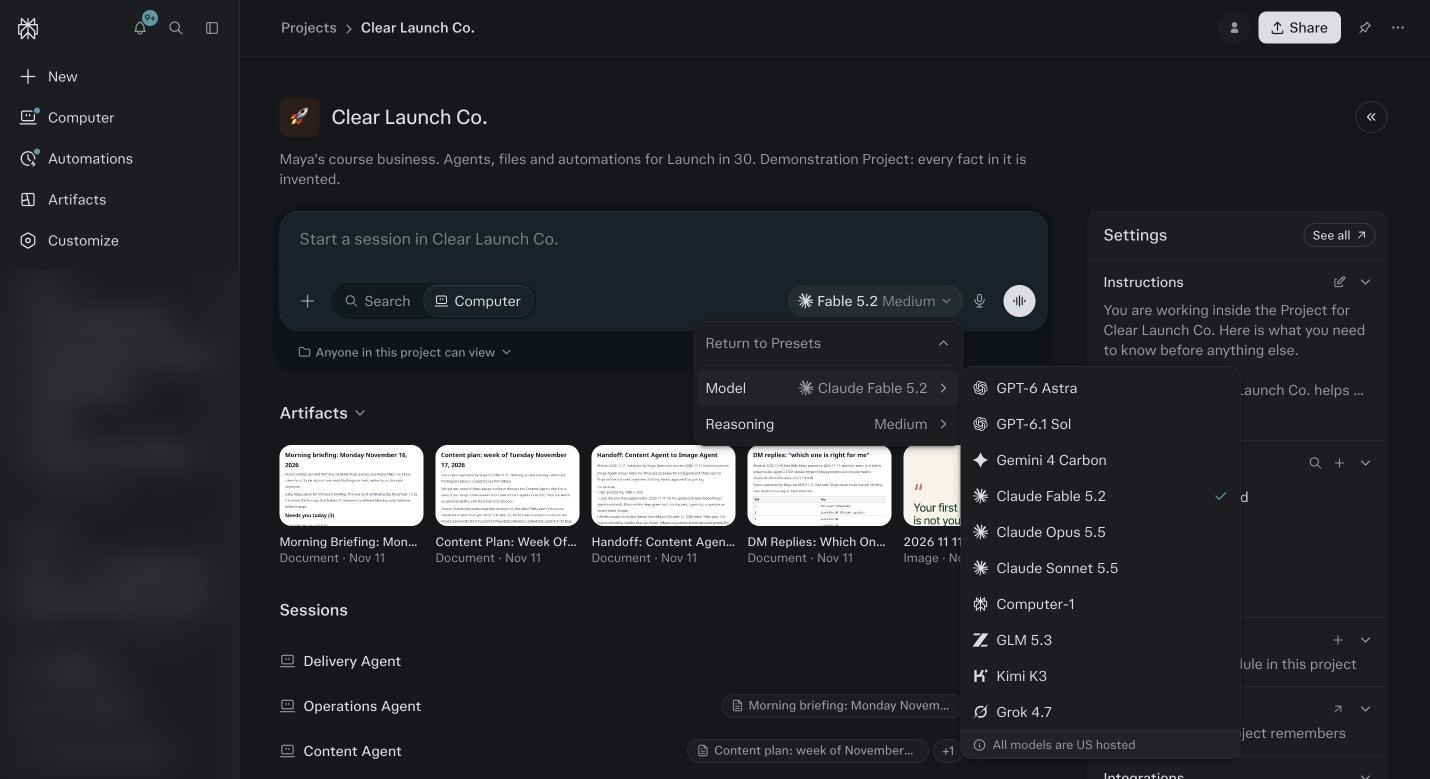
Click Custom, then Model, and this list opens: the ten models available in Computer on November 11, 2026, all US hosted. In the same menu, the Reasoning setting sits directly under Model. Run the trade test once.
Pick a small real job, like summarize this call in five lines. Run it at Light. Open a new session and run the same thing at Ultra. Compare the two outputs and the session usage shown in the right panel. You will feel the trade in one minute and you will never need to be told again.
Read the model table below once.
The point is the three tiers, heavy, middle and light, and nothing to memorize. Heavy is Fable 5.2 and GPT-6 Astra. Middle is Opus 5.5, Computer-1 and Kimi K3. Light is Sonnet 5.5, GPT-6.1 Sol, Gemini 4 Carbon, Grok 4.7 and GLM 5.3.
Set your Project default.
Open Project settings and set the effort you want sessions in this Project to start at. I use High for a business Project. Then remember two things: a session you change by hand keeps its own setting, and automations do not inherit the Project default. Check each one when you create it in module 15.
Learn the override language.
In any session you can say: use the fastest model for this, or do this at Ultra, or switch to Gemini for this one. It changes the setting for that session’s later runs.
Know the two team modes.
Model Council runs two to eight models on the same question at once and writes one comparison. Say: run a Model Council on which of these two offers to lead with. Deep Research is a full report rather than an answer. Both are heavy. Use them for decisions, not for routine.
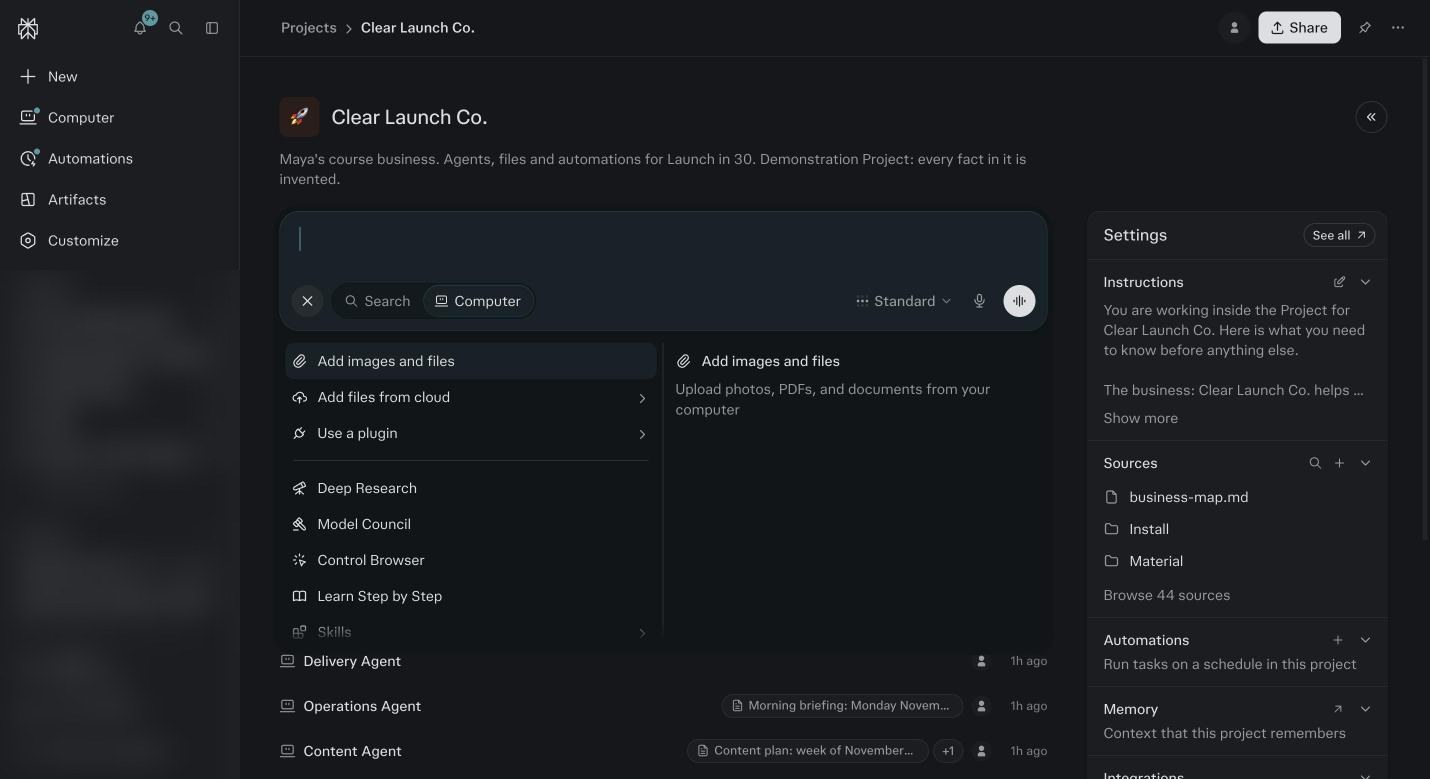
The plus menu in the text box. Deep Research and Model Council are in this list. Both use a lot of credits, so save them for real decisions. Return to Presets.
Click Return to Presets in the picker and put the slider back on High. Leave it there as your default and move it by hand when a job calls for it.
The Four Effort Levels, In Plain Terms
Light
Fast, cheap, shallow. Answers in seconds. Good for sorting, summarizing, tagging, quick lookups, a first draft you will rewrite. Expect it to miss nuance and to sound a little generic in your voice. A short Light session is close to free.
Standard
The sensible middle. A minute or two. Good for briefings, inbox triage, reading a report, a decent draft. Expect solid work on anything with a clear shape. Expect it to flatten your voice a little. Most automations belong here.
High
Careful. Several minutes on a real job. Good for anything that goes to a client or a list, offer work, funnel plans, reviews, writing in your voice. Expect it to catch what Standard missed and to hold your voice. My default for a business Project.
Ultra
Maximum. Ten minutes or more, and it will use the heaviest model on the list. Good for Foundation at depth, a new offer, a big decision, a build. Expect the best output you can get here. Also expect the bill. Never leave an automation on it.
When To Use What
| The job | Effort | What it will likely pick | What to expect | Credits, about |
|---|---|---|---|---|
| Summarize a call in five lines | Light | Sonnet 5.5, Grok 4.7 or GLM 5.3 | A clean summary in seconds. Fine for your own notes. | 10 to 40 |
| Sort your inbox and draft replies | Standard | Sonnet 5.5 or Kimi K3 | Right piles, usable drafts, a little flat in voice. Edit before you send. | 200 to 500 a run |
| Daily briefing from calendar, inbox and numbers | Standard | Sonnet 5.5 | A page you can read in two minutes. Short thread or it climbs. | 100 to 300 a run |
| Weekly review of what the agents produced | High | Opus 5.5 | Reads every session in the Project and tells you what moved. Worth High. | 300 to 800 a run |
| One email in your voice | High | Fable 5.2 | Sounds like you on the first draft. At Standard it sounds like a marketer. | 150 to 400 |
| Five email sequence for a new offer | High or Ultra | Fable 5.2 | A sequence you can load after one pass. Ultra if the offer is new and the angle is not settled. | 600 to 1,500 |
| Turn three calls into five posts | High | Opus 5.5 | Posts with the timestamp they came from. Reading the transcripts is most of the cost. | 500 to 1,200 |
| Review 30 days of Meta ads | High | Opus 5.5 or Fable 5.2 | Kill, scale, refresh, with reasons. Any agent’s first real run on your data lands here. | 400 to 1,000 |
| Design or sharpen an offer | Ultra | Fable 5.2 | Judgment work. The difference between High and Ultra shows here. | 800 to 2,000 |
| Foundation Full | Ultra if you can afford it | Fable 5.2 | Same interview at Standard cost 5,190 and at Ultra 8,872 on my account. The Ultra profile was the better one. | 5,200 to 8,900 |
| Build a sales page or site | Ultra | Fable 5.2 or GPT-6 Astra | A real build. Set a credit ceiling before you start. A full buyer site ran 7,101. | 1,500 to 7,100 |
| A decision that costs more than $20 to get wrong | Ultra, Model Council | Two to eight models at once | One comparison of what each model thinks. Heavy by design. Decisions only. | 500 to 2,000 |
| Read a long transcript or a huge file | Standard | Gemini 4 Carbon | Good at reading a lot and pulling what matters. Cheaper than Fable for the same read. | 200 to 800 |
| Tag, classify or clean a list of 500 rows | Light | GLM 5.3 | Volume work at the lowest price. Check a sample, not every row. | 100 to 400 |
Three Things That Move The Bill More Than The Model
The model matters. These three matter more, and people never look at them.
- The length of the session
- Every message re reads the whole session. A job in a two week old thread cost me 5,000 to 7,000 credits a day. The same job in a fresh thread was a few hundred. Start new sessions. This is the biggest lever you have.
- The effort on your automations
- A daily job set to Ultra runs thirty times a month at the top rate. The same job at Standard does the work for a third of the bill. Check the model on every automation when you create it, and again after a model is retired.
- Reading versus writing
- Reading your files, your inbox and your transcripts is where most credits go. Writing is cheaper than you think. Attach only the file the job needs, not the folder.
Model by model
Claude Fable 5.2
AnthropicHeavy. The top preset uses it.- Use it for
- Long, careful work where judgment matters: Foundation, offer design, funnel plans, anything in your voice, code. The agents were built on it.
- Watch for
- The most expensive per token on the list, about five times the light tier. Wrong for daily briefings and triage. Slower than the light tier.
GPT-6 Astra
OpenAIHeavy- Use it for
- Deep analysis, long documents, complex multi step tasks. A second opinion to Fable on a big decision. Has Fast and Ultrafast speed settings.
- Watch for
- Same price tier as Fable. Ultrafast costs more credits again. Do not leave an automation on it.
Claude Opus 5.5
AnthropicMiddle- Use it for
- Strong reasoning at under half the price of Fable. Good default for writing drafts, reviews and research when you want quality without the top bill.
- Watch for
- Not the model the agents were tuned on, so voice work can drift slightly. Check the first output.
Computer-1
PerplexityMiddle- Use it for
- Perplexity’s own model, built for Computer tasks: tool use, reading connected data, running steps in order.
- Watch for
- New to the list on November 11, 2026. Not yet tested inside the agents, so treat it as an option, not a default.
Kimi K3
MoonshotMiddle- Use it for
- Reasoning heavy tasks, long context, planning. Supports reasoning levels from minimal to max, so you can tune it.
- Watch for
- Less tested inside the agents. Treat it as a second opinion rather than a default.
Claude Sonnet 5.5
AnthropicLight- Use it for
- The balanced everyday model. Briefings, triage, summaries, sorting, first drafts you will edit. My pick for most automations.
- Watch for
- Shallower on open ended strategy. If an answer feels thin, rerun it at High.
GPT-6.1 Sol
OpenAILight- Use it for
- Fast everyday work, data wrangling, spreadsheets, quick research. Has Fast and Ultrafast speed settings for when you are waiting on it.
- Watch for
- Speed settings cost more. Keep it on Normal for scheduled jobs.
Gemini 4 Carbon
GoogleLight- Use it for
- Research, coding and analysis, large files and long transcripts. Good at reading a lot and pulling out what matters.
- Watch for
- Replaced Gemini 4 Argon on the list in November 2026. Its price tier may move, so recheck it in a month.
Grok 4.7
xAILight, the cheapest output on the list- Use it for
- Quick reads, current events, fast summaries, anything where you want an answer in seconds.
- Watch for
- Less consistent on long structured work. Not for voice.
GLM 5.3
Z.AILight- Use it for
- Routine reasoning at the lowest price. Bulk jobs like tagging, classifying, cleaning a list.
- Watch for
- Least tested of the ten inside the agents. Use it for volume, not for anything a client sees.
Tiers are relative token prices from the provider rates Perplexity publishes. Heavy is about five times light. Names change monthly, tiers do not.
Before you ask
Which one should I just use?
Leave it on High and let Computer pick. Go to Ultra for Foundation, offers and anything in your voice. Drop to Light or Standard for scheduled jobs. Open Custom only when you have a reason.
Why does my account show a different list?
Plan, region and rollout. Models come and go monthly, and not every plan or region sees the same list on the same day. The three tiers stay the same even when the names change.
Does the model change the credits a lot?
Yes. A heavy model costs about five times a light one for the same work. A long session at Ultra on Fable is the most expensive thing you can do here. A short one at Light on Sonnet is close to free.
Why not run everything at Ultra and get the best?
Because most jobs do not need it and the bill is real. Triage at Ultra is the same piles as triage at Standard for five times the price. Save Ultra for judgment work: offers, Foundation, decisions, builds.
Why not run everything at Light and save money?
Because anything in your voice will come back sounding like a marketer, and you will spend the saved credits rewriting it. Light is for work nobody else reads.
Does the agent choose the model or do I?
By default, Computer does, inside the effort level you set. The agents were tested on that. You override by hand in a session, or in the automation’s settings. The one place to be deliberate is automations.
What happens when a model on this list is retired?
Sessions fall back to the preset. Automations do not, they sit. After a model retirement, open every automation and set the model again. Module 18 has it in the fix table.
Is Fast or Ultrafast worth it?
Only when you are sitting there waiting. It costs more credits for the same answer. Never on an automation, which runs while you sleep anyway.
Should I use Model Council for everything important?
No. For decisions that cost more than $20 to get wrong and where you want to see models disagree. For writing, pick one model and run it at High.
Does Perplexity have its own model?
No, and that is the point. It runs the models from the other companies, Claude, GPT, Gemini and the rest, and swaps them in as they get better or cheaper. You pick per task, or let Computer pick. You are never stuck with one lab’s bad month.