Most AI remembers a little about you and nothing about your business
You start over every day.
Perplexity is different, and this is the part of the whole system that makes the agents feel like they have worked for you for years. But there is not one memory. There are four layers, and they do different jobs. If you do not know which layer holds a fact, you will fix it in the wrong place and it will come back.
Memory is the simple one
It saves small facts from your sessions, your preferences, what you shared, and uses them later. You turned it on in module 2. You can see every line it saved under Manage memories, search them, delete any one of them. It is built by a model that favours what you say often, and it filters out health and money details by design. It makes Search personal and it follows you everywhere.
Brain is the deeper one
It is Max only, Computer only, and still a research preview as I write this. It runs in the background, after your sessions, not during them. It reads your sessions, your connected tools, the files you made and your corrections, and builds a connected picture of your projects, your people, your documents, your decisions and your open loops. Every entry links back to the session or file it came from, so you can open it, check it, and fix it. When you open Memory you see Brain’s work sorted into Concepts, Entities and Workstreams. It is a wiki about your business that writes itself. And it is the reason a new session can pick up where last month left off without you explaining anything.
Inside a Project there is a third layer: the Project’s own Brain, shared by everyone in that Project, built from that Project’s sessions and files. You control whether it updates automatically, which uses the owner’s credits, or only when you say update now. And you control whether sessions in the Project can also use your personal memory, with a switch called Use session creator’s memory. For a client Project, you turn that off. The Project becomes a wall.
The fourth layer is the one you built: Foundation and the Project files. That is your full written profile, your offers, your voice, your map. Memory and Brain are what Perplexity noticed. Foundation is what you told it on purpose. When they disagree, Foundation wins, and you fix the memory.
The habit is one minute a week
Open Manage memories, read what landed, delete what is wrong. Your agents are only as right as what they remember about you.
What you do, step by step
Open Settings, then Memory.
Confirm every switch is on from module 2. Read the names once more: search history, notes, Brain, skill improvement, use connectors.
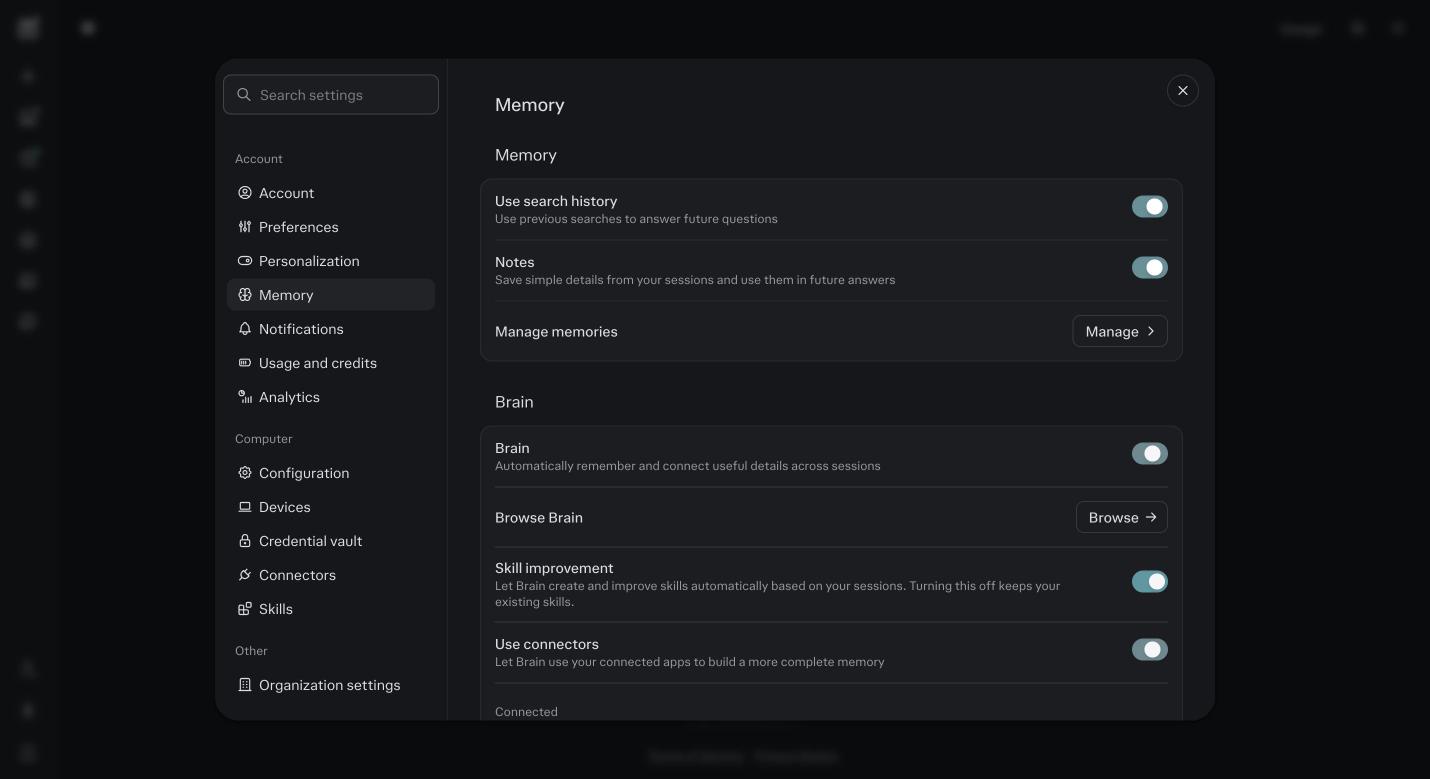
Settings, then Memory. The Memory switches are at the top of the page and the Brain switches are under them. The Manage button is where you read and delete what it has saved. Click Manage under memories.
If you did module 5, Block A is here, forty to sixty lines. Read them. Delete anything wrong or anything you do not want remembered. Family names, health, home address, personal money figures. Decide now, not after it has used them.
Test a save.
In any session outside a Project, say: remember that my main offer is called X and it is priced at Y. Then open a brand new session and ask: what is my main offer and what does it cost. If it answers right, memory took.
Test a correction.
Say: that is wrong, the price is Z, update your memory. Open another new session and ask again. Then open Manage and find the line. It should read Z.
Open what Brain has built.
In a Project it is under Project settings, Sources, then the Brain tab. For your account it is Settings, Memory, Manage. It is sorted into Concepts, Entities and Workstreams. Open one entry. Read it, follow the link back to the session it came from. Edit or delete anything wrong. If it is nearly empty, that is normal in week one. Brain runs after your sessions and gets richer the more you use Computer on the same work.
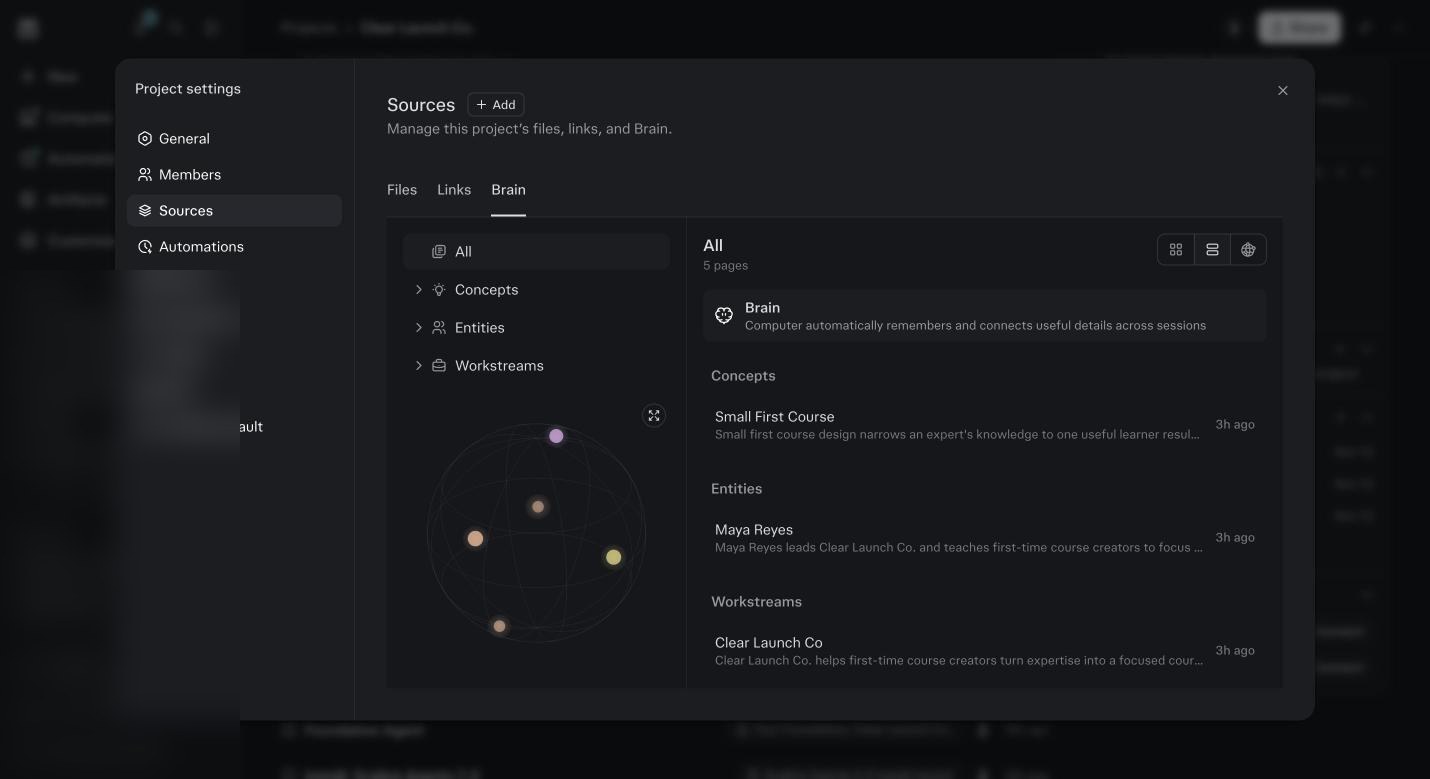
The demo Project’s Brain the morning after ten sessions. Project settings, Sources, Brain. One concept, one entity, one workstream, each with a line of what it learned and a link back. 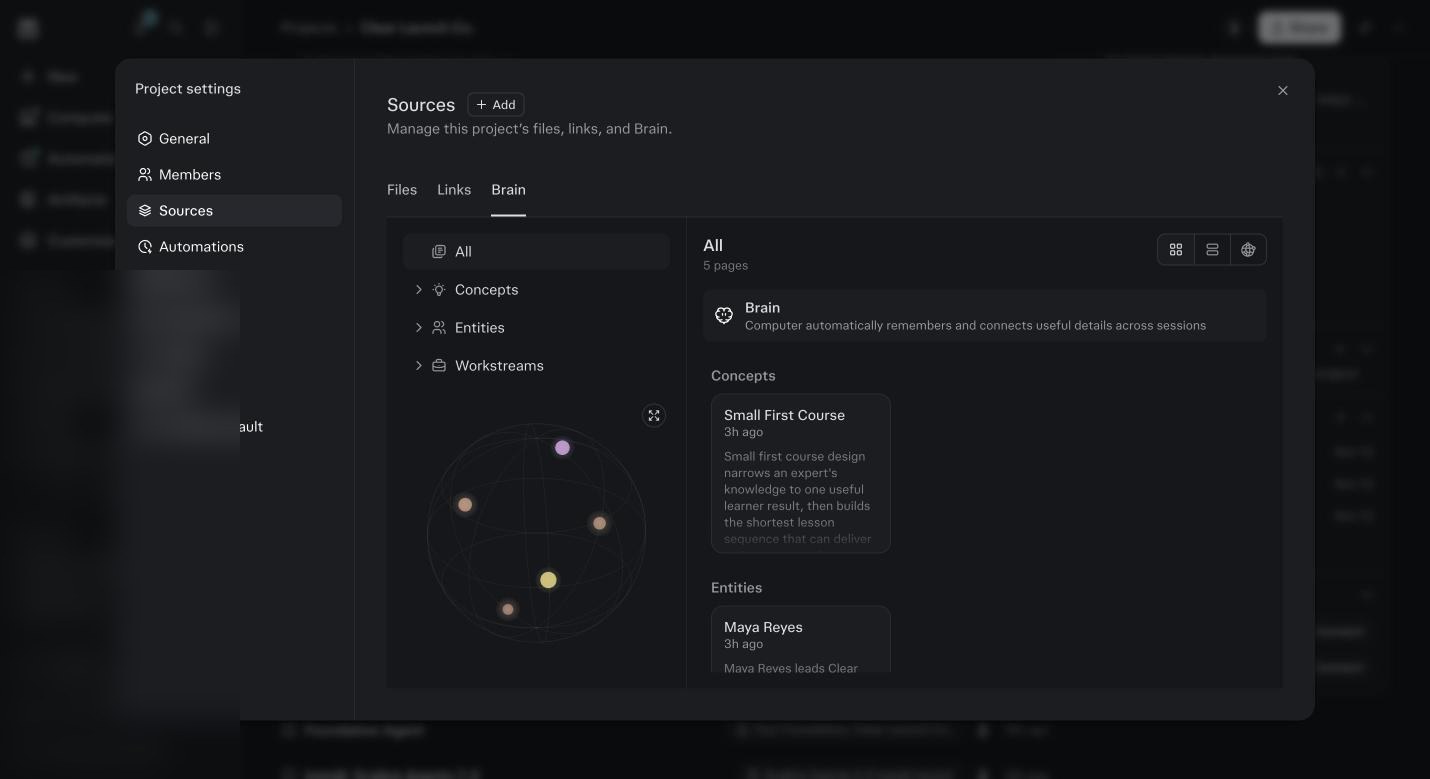
The same Brain as a map. Five pages, pulled from the sessions and files, nothing typed in by hand. Test Brain.
Open a new session inside your Project and ask: what did I decide in my last three sessions here, and where. If Brain has had a few sessions, it answers and points at them. If it does not yet, give it a week.
Open Project settings, then Memory.
Read the two switches. Update automatically means the Project’s Brain refreshes on its own and uses the owner’s credits. Use session creator’s memory means your personal memory joins Project sessions. For your own business Project, both on. For a client Project, the second one off.
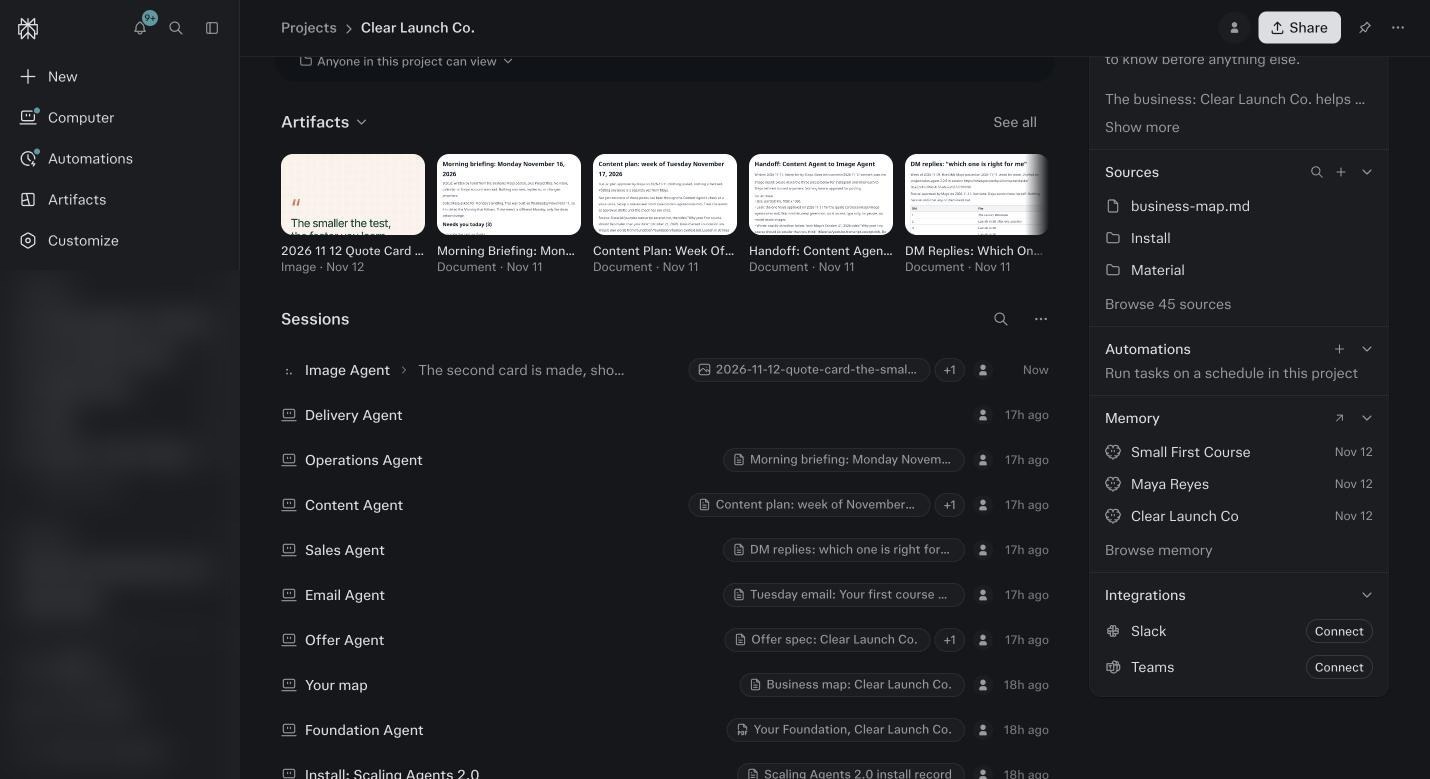
The demo Project page the morning after. Memory on the right lists what Brain built overnight: Small First Course, Maya Reyes, Clear Launch Co. Browse memory opens the full list. Decide the client rule.
The connectors expose your clients’ names and emails to the agents. Write one line into your Project instructions: never save client personal details to memory, keep them in the Project. And tell your clients plainly that an AI reads your inbox and calendar.
Put the weekly check on your calendar.
Settings, Memory, Manage. One minute. Delete what is wrong.
Where A Fact Lives, And Where To Fix It
| Layer | What it holds | Where you see it | Who controls it | Use it for |
|---|---|---|---|---|
| Memory | Small facts and preferences from your sessions. Filters health and money details. | Settings, Memory, Manage memories. Search, filter, delete one or clear all. | You. Turn it off and it stops using memories but does not clear them. Incognito never writes to it. | How you like to be answered. Standing facts about you. Block A from module 5. |
| Brain, your account | A connected picture of your projects, people, files, decisions and open loops, built from sessions, connected tools and artifacts. Every entry links to its source. | Memory, sorted into Concepts, Entities and Workstreams. Open an entry, follow it to the session or file. | You. Settings, Memory, Brain switch. Max and Computer only. Runs in the background, not during tasks. | Picking up long running work in a new session. Knowing what you decided and why. |
| Brain, inside a Project | The same kind of picture, but only from this Project’s sessions and files, shared by everyone in the Project. | Project settings, Memory. Or Sources, Brain in the new layout. | The Project owner. Update automatically uses the owner’s credits. Update now uses yours. Use session creator’s memory decides if personal memory joins in. | A client Project that must stay walled. A team Project where everyone needs the same picture. |
| Foundation and Project files | What you told it on purpose: your profile, offers, voice, stories, brand, your map, every agent’s saved work. | Project files, the foundation folder. | You, through the Foundation session. Say: fix my foundation. | The truth every agent reads first. When memory and Foundation disagree, this wins. |
Four Things You Stop Doing Once Brain Has Run For A Month
Re explaining the project
You open a new session and say: continue the Tuesday email. It knows the offer, the pages, who is on it, and what you decided last Thursday, because every session wrote into Brain.
Hunting for the decision
You ask: why did we keep the workbook at $47. It tells you, and links to the session where you decided it. The link is the part that matters. You can check it.
Repeating a correction
You told an agent your main list is called Members, not Everyone. Brain reinforces what is still true and marks what changed. The correction holds across sessions, not just the one you were in.
Rebuilding context from scratch
Tasks that use Brain run faster because Computer reuses what it knows instead of reading everything again. Fewer credits reading, more credits working.
The Rules I Write Into Every Project
Memory is useful until it holds the wrong thing. These are the lines I use.
- Never save client personal details to memory
- Names, emails, health, money. They stay in the Project. Put this line in your Project instructions and the agents follow it.
- Tests are not facts
- Before you run anything with made up data, open with: this is a test, do not remember any of it. Otherwise your demo prices end up in your real emails.
- Turn personal memory off in client Projects
- Project settings, Memory, Use session creator’s memory, off. The Project’s own Brain still works. Your personal memory stays out.
- Use incognito for anything you do not want kept
- Incognito never writes to memory or Brain and never reads from them.
- Tell your clients
- An AI reads your inbox and calendar and keeps a working picture of your business, including them. Say so plainly, in your onboarding. It is the right thing and it is also the law in a lot of places.
Before you ask
What is the difference between memory, Brain, Foundation and Project files?
Memory is small facts about you, everywhere. Brain is the connected picture across sessions, everywhere, and per Project. Foundation is your full written profile, inside the Project. Project files are the raw material. Fix a wrong fact where it lives.
Can I turn Brain off for one Project?
Yes, in that Project’s Memory settings, if you own it. You can also turn it off for your whole account under Settings, Memory. And incognito sessions never touch it.
It remembered something from a test I ran.
The most common wrong memory. Delete it in Manage memories. Next time you test with made up data, open with: this is a test, do not remember any of it.
Does Brain cost credits?
Running it on a Project with Update automatically on uses the Project owner’s credits. Update now uses yours. Tasks that use Brain usually cost less overall because Computer reads less to get its bearings.
Does Brain read everything I have ever done?
It reviews your recent activity in the background: sessions, connected tools, files you made, corrections. Your activity only, never anyone else’s. Incognito is excluded. It does not act or message you on its own.
I deleted a memory and it came back.
Perplexity keeps a log of cleared memories for up to 30 days to stop that from happening. If it did come back, something in a session restated it. Find the session, correct it there, delete the memory again.
Can Brain change my agents?
Not today. Skills that improve themselves are a future feature on top of Brain, and anything that would change how Computer works is shown to you first. Your corrections to an agent land in that agent’s own rules, which you can read in Project files.
My team member sees different things than I do in our Project.
The Project’s Brain is shared. Personal memory is not. If Use session creator’s memory is on, each of you also draws on your own memory, so answers differ. Turn it off for one picture everyone shares.
Where does Block A from module 5 go?
Into Memory, through your own messages, ten lines at a time. Perplexity decides what it keeps, and not every line lands on the first pass. Check Manage memories after and paste again what is missing.